
On this page
If you haven’t registered your branded sender ID now is the time. SMS sent using unregistered sender IDs are now being labelled as ‘Unverified’. Contact your message provider if you:
- want to register a Sender ID or
- need to confirm if your Sender ID registration is complete or
- think your messages are being wrongly marked as 'Unverified'.
Why am I receiving an error message when I try to log into the register?
If you are receiving a message that you are not an authorised contact when you try to log into the SMS Sender ID Register for the first time, your email might not be listed in the relevant section of the Australian Business Register (ABR).
To access the SMS Sender ID Register via ACMA Assist, you need to use an email address listed as an ‘authorised contact’ or ‘service of notice’ for your Australian Business Number (ABN) on the ABR.
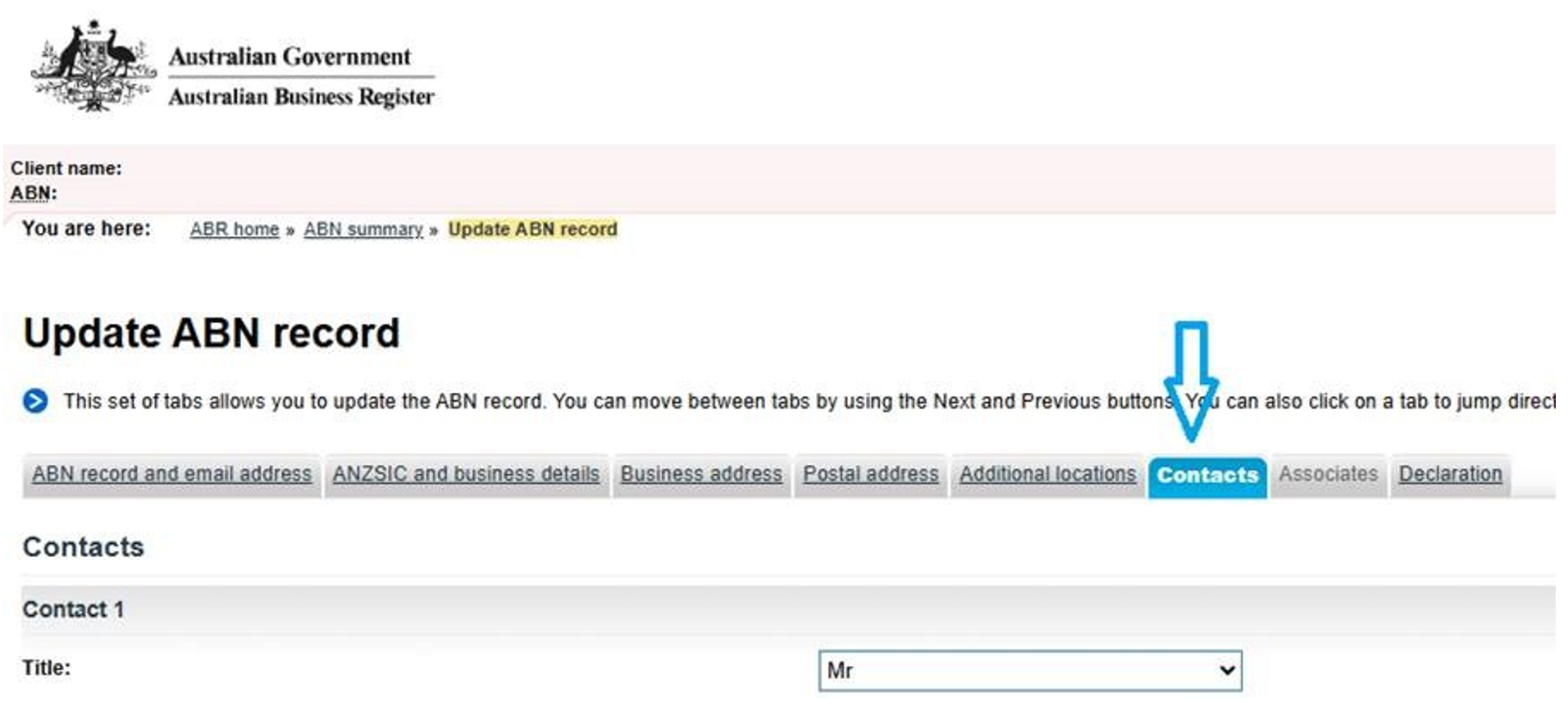
If you see a message saying you are not an authorised contact, you may need to update your ABN contact details on the ABR.
Please note that the ACMA does not currently use Relationship Authorisation Manager (RAM) to check who is authorised to access the SMS Sender ID Register.
Why can’t I see the Sender ID tab or my business details in ACMA Assist?
If your message provider applied to register a Sender ID for you, we would have emailed you with the subject line ‘SMS Sender ID Register: request to confirm your application’.
That email includes a unique link you need to use to confirm your Sender ID registration, like the one shown below.
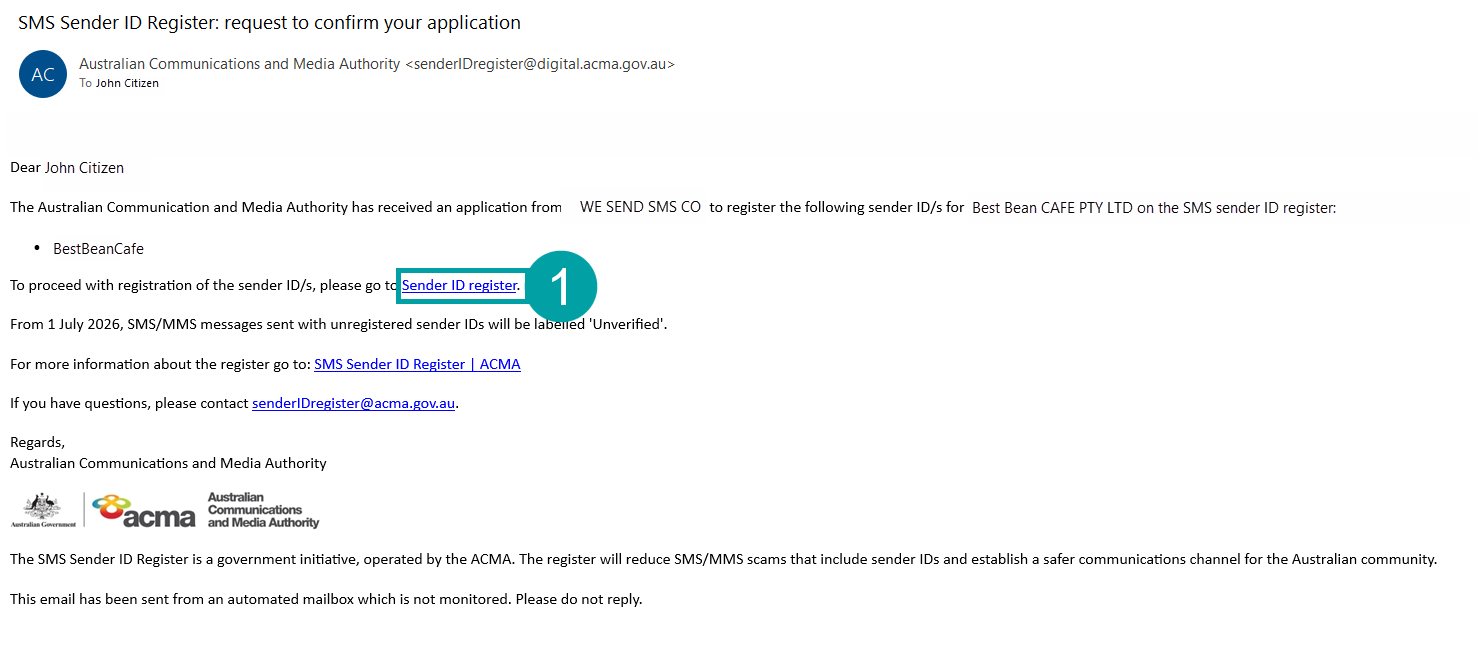
You must sign in using this unique link. If you sign in another way, ACMA Assist will not link your account to the Sender ID application.
After you sign in using the unique link, you will be taken to a page where you can verify your ABN and confirm your Sender ID application.
If you need another copy of this email, you can request one by emailing info@acma.gov.au.
Why is my application marked ‘Under review’?
After you confirm your organisation’s Sender ID application in ACMA Assist, we will email you to let you know if the Sender ID has been registered. Most applications are approved within 24 hours. Sometimes an application is marked ‘Under review’ as part of our routine checks.
Due to a high number of applications, some reviews are taking longer than usual. The Sender ID Team is processing them as quickly as possible and will contact you as soon as your application has been assessed.
Is there a faster way to register multiple Sender IDs or business entities?
Sender ID registration is linked to the ABR, enabling us to check that an organisation is legitimate, and the person making the application is an authorised by that organisation. At the moment, there is no faster or alternative registration process for Australian businesses.
Are there any fees for the register?
We will consult on fees in the future.
Do I need to register if I only send SMS messages from a phone number?
No. You do not need to register if your organisation only sends SMS messages using a phone number and does not use a branded sender ID.
The SMS Sender ID Register only applies to messages that use a sender ID such as a business or organisation name (for example, ‘ACMA’, ‘AusPost’ or ‘myGov’).
If your messages display a phone number instead of a sender name, no action is required.
My myID strength is not high enough. How do I upgrade my Digital ID?
To access the SMS Sender ID Register through ACMA Assist, you need a myID Digital Identity with at least standard identity strength.
If your myID does not meet the required strength level, you will need to upgrade your identity by verifying additional identity documents in the myID app.
For help upgrading your myID or resolving identity verification issues, visit the myID website or contact myID support directly.
If you are unable to obtain a Standard-strength myID, you may be able to register your sender ID through a certified telco provider as a non-ABN entity. See Register a sender ID if you don’t have an ABN for more information.
How do I access ACMA Assist to manage my Sender ID?
If a telco or messaging provider has submitted a Sender ID application on your behalf, you must use the unique registration link provided in the email titled ‘SMS Sender ID Register: request to confirm your application’ to access the register.
When you open the link, sign in using your myID and follow the prompts to review and confirm your Sender ID application.
To access the register successfully, you must:
- have a myID Digital Identity with at least Standard strength, and
- have access to an email address recorded as an authorised contact or service of notice email address on the Australian Business Register (ABR).
More information about accessing the register for the first time is available at 4.1 Accessing the register for the first time.
Instructions for how to access the register to manage existing registrations is available at 4.6 Returning to the register.
How do I know if my Sender ID has been successfully registered?
You can check the status of your Sender ID by logging in to ACMA Assist and selecting the Sender ID tab.
A Sender ID showing Complete has been approved and registered.
Other statuses include:
- Pending – awaiting confirmation.
- Registered by [date] – approved and scheduled to become active on the specified date.
- Under review – being reviewed by the ACMA.
If your Sender ID status is Complete, your registration has been successfully finalised.
I haven't received the email with my Sender ID registration link. What should I do?
Check your junk mail or spam folder for an email titled:
‘SMS Sender ID Register: request to confirm your application’
Contact your telco to confirm the email address provided in your application form was entered correctly.