
On this page
Text messages with sender IDs
A sender ID is the branded name at the top of text messages from a business or organisation. It tells you who the message is from, like ‘ATO’, ‘AusPost’ or ‘myGov’.
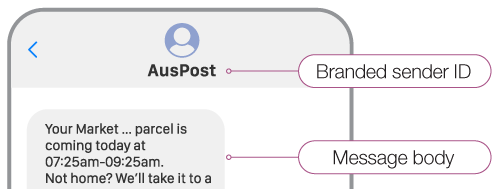
From 1 July 2026, you can be more confident that any SMS or MMS messages you receive with a sender ID is from the organisation or business named in the sender ID.
These changes will happen automatically – you do not need to do anything.
Getting texts from ‘Unverified’
From 1 July 2026, you may get messages from ‘Unverified’.
Check these messages carefully. It may be a scam, or it may be from a real business or organisation that hasn’t registered their sender ID yet.
If you’re in doubt: don’t reply, don’t click on links, don’t give personal details and don’t give money.
If a text looks suspicious, find the official contact details yourself – for example, on a bill or the organisation’s website.
If you get a message from ‘Unverified’ that you believe is legitimate, you may wish to let the organisation know. The organisation should register their branded sender ID so customers can receive the messages and be confident who it is from.
Messages from phone numbers
The rules do not apply to text messages from phone numbers instead of a branded sender ID. Treat messages from unknown numbers with caution.
If you’re in doubt: don’t reply, don’t click on links, don’t give personal details and don’t give money.
If a text looks suspicious, find the official contact details yourself – for example, on a bill or the organisation’s website.
Messaging apps
The new rules only apply to text messages (SMS/MMS). They do not apply to messaging apps such as WhatsApp, iMessage and Facebook Messenger.
You may still receive scam messages on these kinds of messaging apps, even if the sender name looks familiar. Check these messages carefully.
Report scams and get help
If you think you’ve received a scam message, report it to ScamWatch.
If you think your money or personal information has been stolen, tell your bank and phone company immediately.
If you’ve had personal details stolen, contact IDCARE. You can also call 1800 595 160.
Learn about how to protect yourself from phone and SMS scams.