
On this page
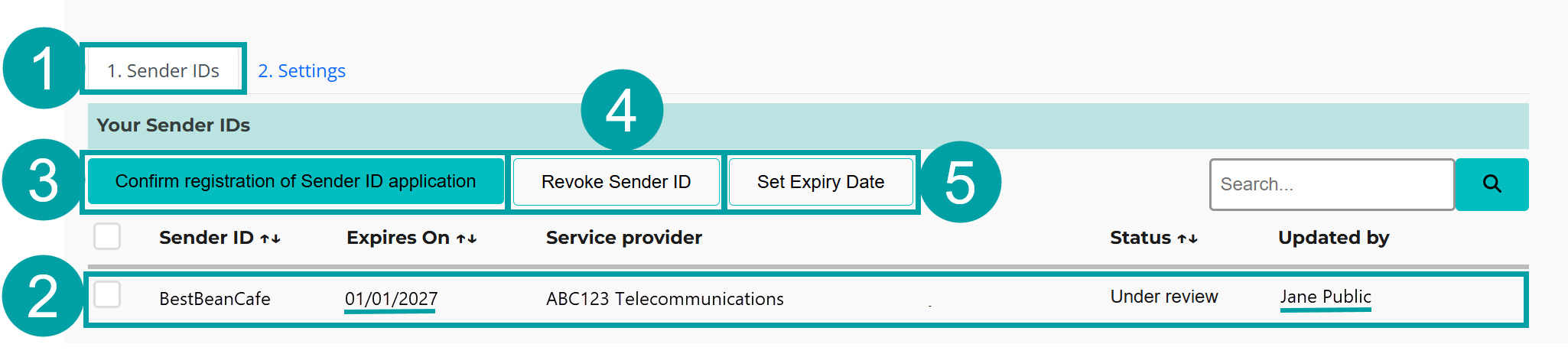
You can view, search and manage sender IDs for your organisation via the sender IDs tab.
In the SMS Sender ID Register:
- Click on the Sender IDs tab.
From this screen you can perform the following functions:
- View the details of your sender IDs (Section 4.3.1).
- Confirm registration of a sender ID application (Section 4.3.2).
- Revoke a sender ID (Section 4.3.3).
- Set an expiry date for a sender ID (Section 4.3.4)
|
4.3.1 View the details of your sender IDs
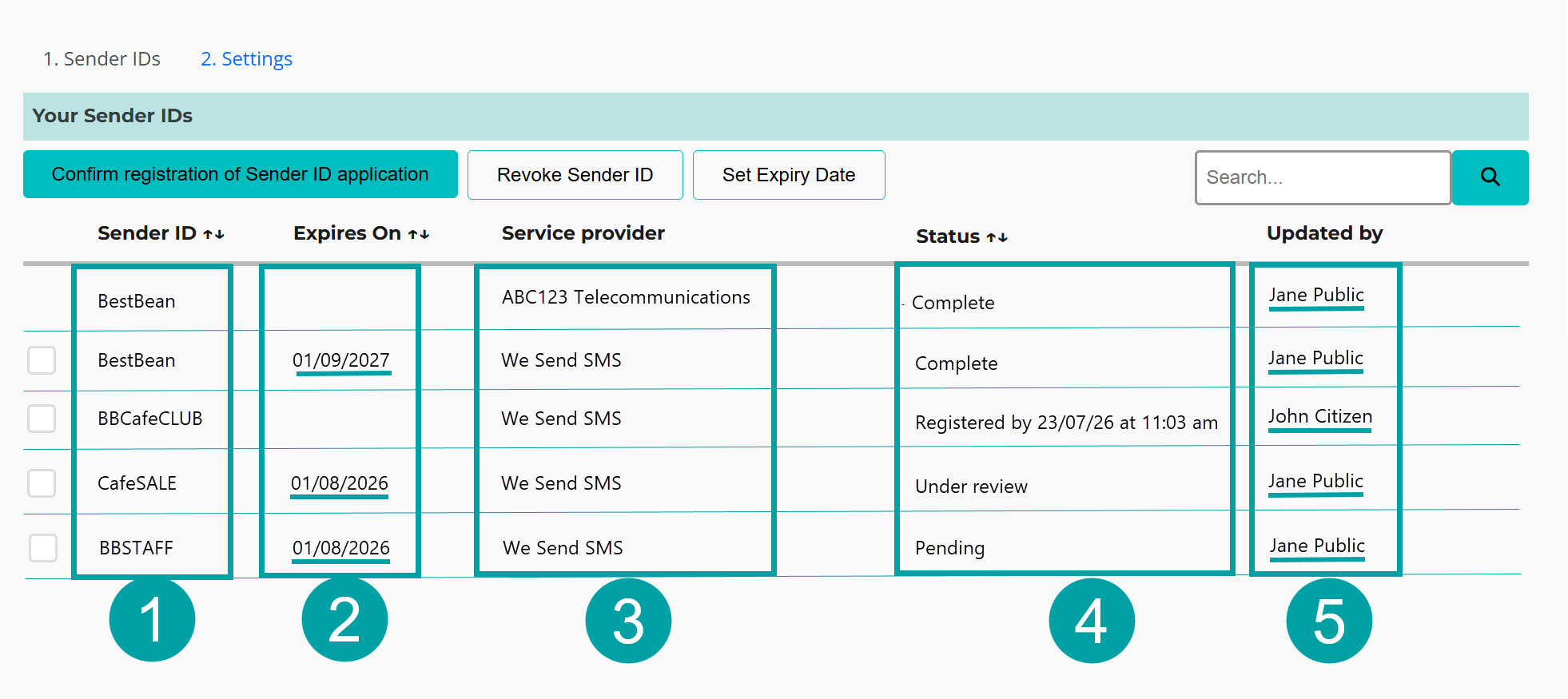
This is where you will see a list of all your registered and pending sender IDs, and the telcos that are authorised to send messages for each of those sender IDs. If you revoke a telco’s authorisation to send messages using a registered sender IDs, that entry will no longer appear in the list. See Revoke authorisation for a sender ID (Section 4.3.3)
The list includes the following information:
- Sender ID
Sender IDs that have been registered for your organisation. There will be an entry for each telco that is authorised to send messages for you using that sender ID.
- Expiry
The expiry date of a sender ID, if one has been set by your organisation. This is an optional field and should only be used if the sender ID will be used for a limited period of time. The expiry date must be between 7 days and 12 months.
- Service provider
The telco(s) that are authorised to send messages for you using that sender ID.
- Status
The status of sender ID applications. This may be different for each telco you have authorised to send messages for you. Statuses include:
- Pending – the application to register the sender ID is awaiting your confirmation.
- Registered by [date] – The ACMA has approved your application and the sender ID will be registered by the specified date and time.
- Complete – The ACMA has approved your application and the sender ID is registered.
- Under review – The ACMA has flagged your application for review. You will be notified of the outcome of your application once the review is complete.
- Updated by
The name of the last person from your organisation who updated the sender ID. You can click on the name to send that person an email.
|
4.3.2 Confirm registration of sender ID(s)
After your telco has applied to register sender ID(s) on your behalf you will receive an email asking if you want to proceed with the application.
To confirm registration of the sender ID(s)
- Click on the Sender ID register link in the email.
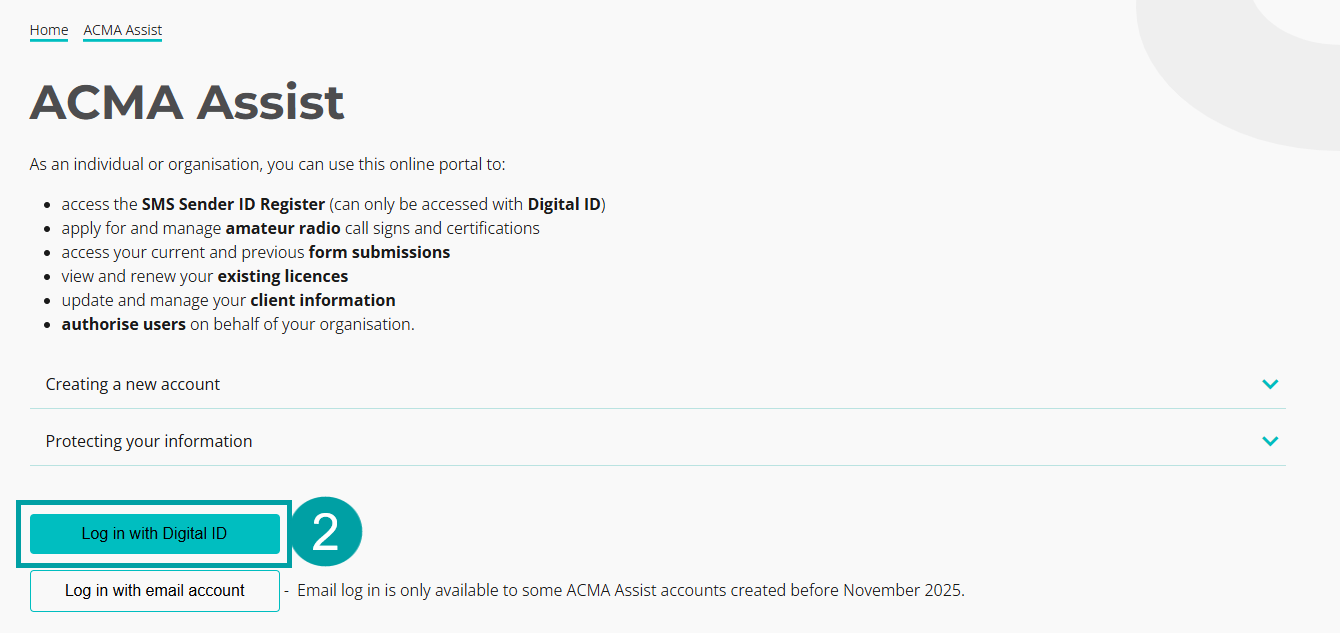
You will be taken to the ACMA Assist log in page, where you will need to log in using your Digital ID (myID). See https://www.acma.gov.au/instructions for more instructions.
- Click on the Log in with Digital ID button.
|
You will be taken to the Australian Government myID log in page. Follow the prompts to log in using your Digital ID.
Once you log in, you will be taken to your account for the SMS Sender ID Register.
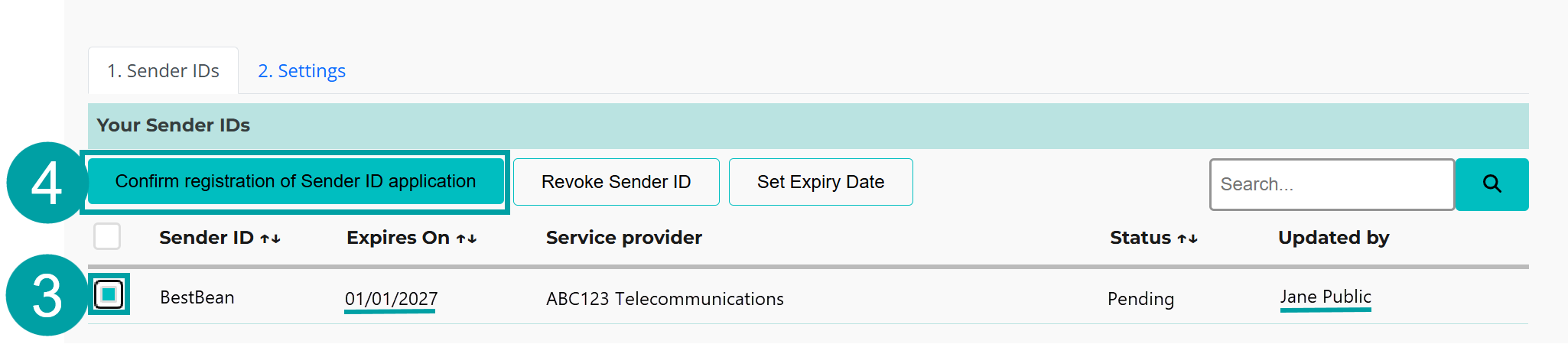
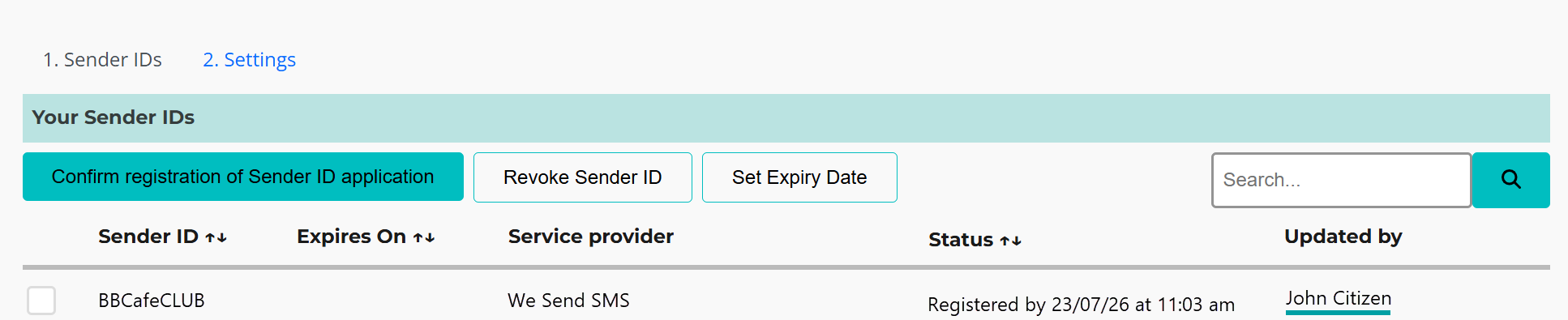
- Click the box to the left of the sender ID(s) you want to confirm.
- Click the Confirm registration of Sender ID application button.
|
The status will change from pending to one of the following:
- Registered by [date] – The ACMA has approved your application and the sender ID will be registered by the specified date and time.
- Complete – The ACMA has approved your application and the sender ID has been registered.
- Under review – The ACMA has flagged your application for review. You will be notified of the outcome of your application once the review is complete.
|
4.3.3 Revoke a sender ID
You can revoke the use of a sender ID from one or more telcos by logging on to the SMS Sender ID Register in ACMA Assist.
You can revoke the use of a sender ID from either:
- Selected telcos - the sender ID will remain on the register but will no longer be available for use with the selected telcos.
- All telcos – If you have revoked all the telco authorisations for a sender ID, your sender ID registration will become inactive. At least one telco must be authorised to send messages for a registered sender ID for your registration to remain active.
In the SMS Sender ID Register:
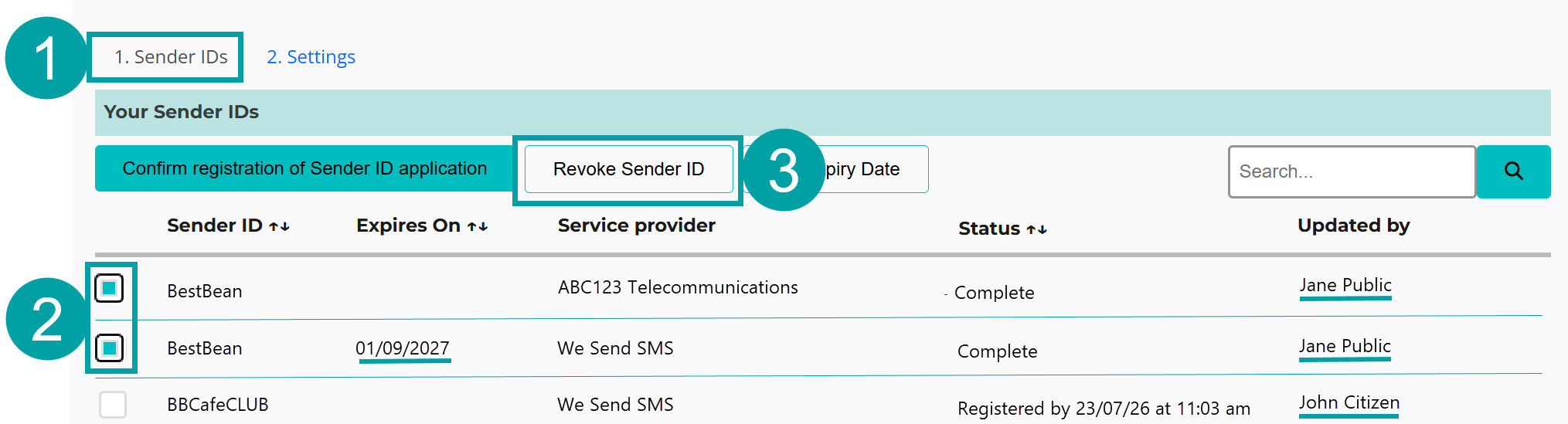
- Click on the Sender IDs tab.
- Select the sender ID(s) that you want to revoke access to.
- Click on the Revoke Sender ID button.
|
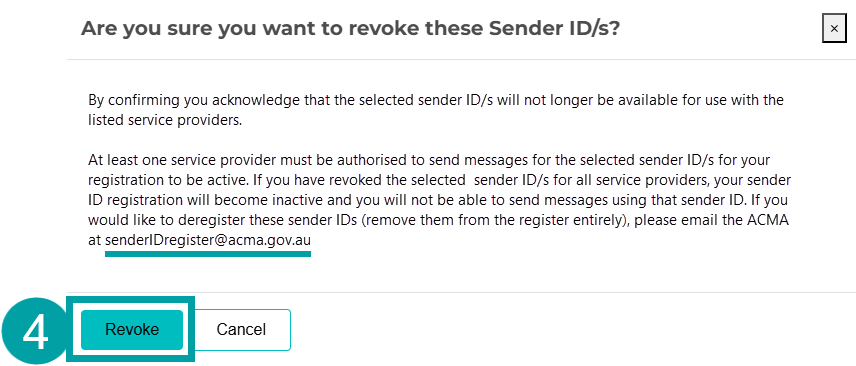
A pop-up box will appear
- Click on the Revoke button.
|
The sender ID(s) will be removed from your list and/or will no longer be available to the selected telco(s).
|
|
4.3.4 Set an expiry date for a sender ID
Either at the time of applying to register sender a ID through your telco, or once the sender ID has been registered, you can set an expiry date for a sender ID. This is an optional field and should only be used if the sender ID will be used for a limited period of time.
In the SMS Sender ID Register:
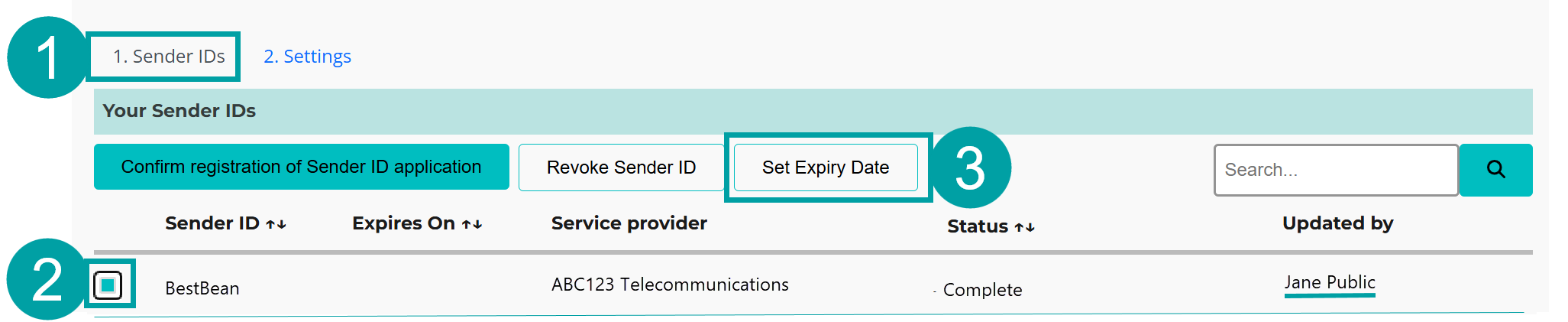
- Click on the Sender IDs tab.
- Select the sender ID(s) that you want to add an expiry date to.
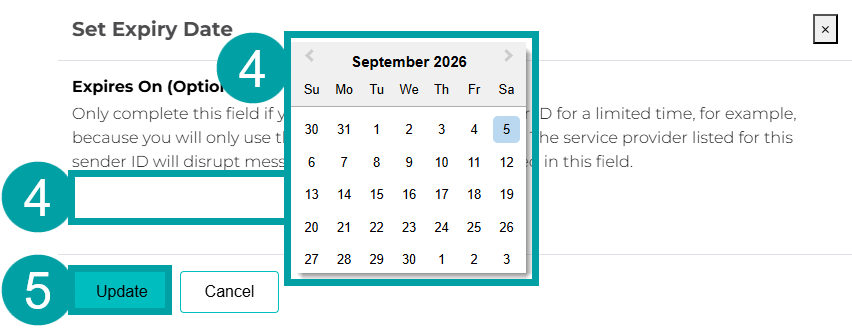
- Click on the Set Expiry Date button.
|
A pop-up box will appear
- Select or type Expires On date. The expiry date must be between 7 days and 12 months.
- Click on the Update button.
|
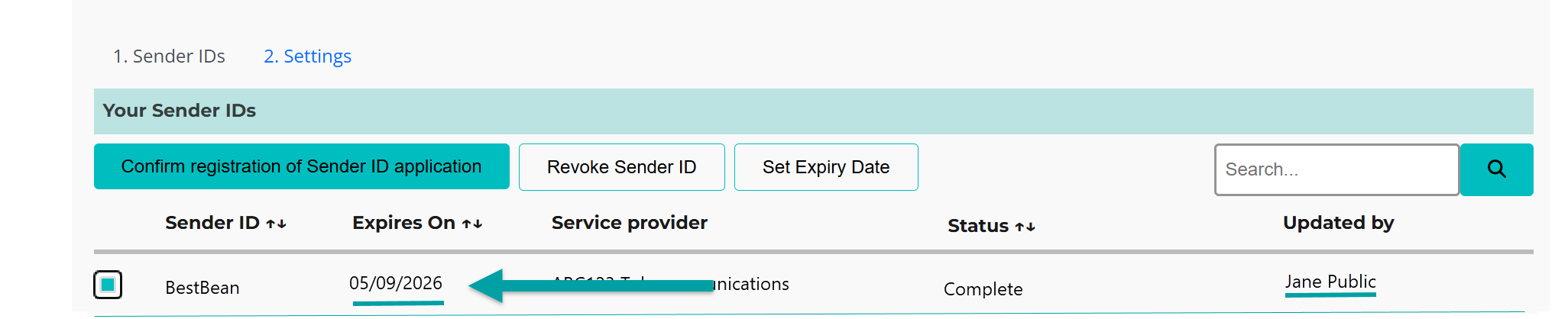
You will see the expiry date in the register.
|
4.3.5 Edit or remove an expiry date for a sender ID
In the SMS Sender ID Register:
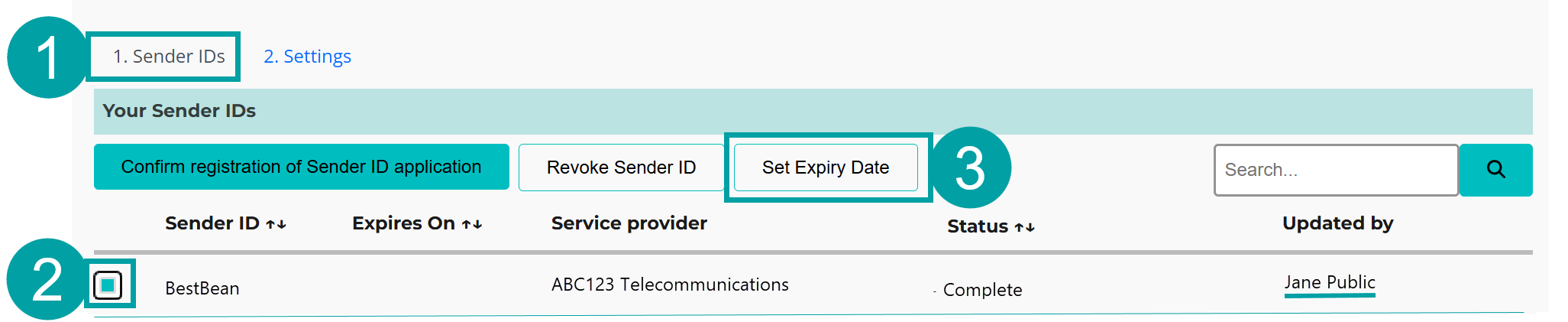
- Click on the Sender IDs tab.
- Select the sender ID(s) that you want to edit or remove the expiry date from.
- Click on the Set Expiry Date button.
|
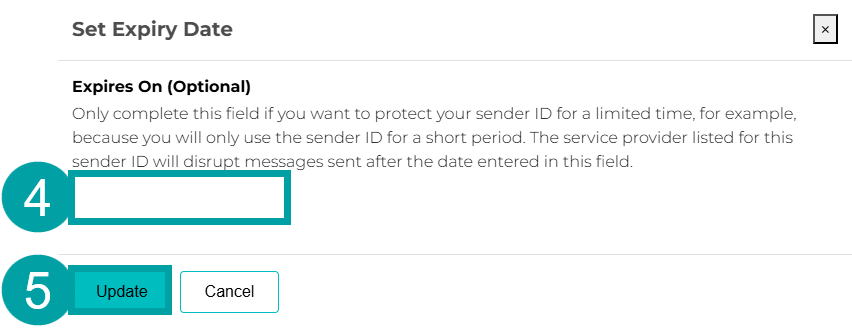
A pop-up box will appear
- Edit the Expires On date or leave it blank to remove the expiry date completely.
- Click on the Update button.
|
Key terms
ABN (Australian Business Number)
Has the meaning given by section 41 of the A New Tax System (Australian Business Number) Act 1999.
ABN entity
An entity with an Australian Business Number (ABN) as listed on the Australian Business Register (ABR).
ABR (Australian Business Register)
The register established under section 24 of the A New Tax System (Australian Business Number) Act 1999.
ACMA Assist
ACMA Assist is the online portal for the ACMA.
Customer
An entity that has a contractual arrangement with their telco relating to the sending of sender ID messages.
Entity
One of the following who uses or proposes to use sender ID messages:
- an individual
- a body corporate
- a corporation sole
- a body politic
- a government entity (within the meaning of the A New Tax System (Australian Business Number) Act 1999)
- a partnership
- any other unincorporated association or body of persons
- a trust
- a superannuation fund (within the meaning of the Superannuation Industry (Supervision) Act 1993).
Entity associate
An entity that is authorised to send messages using a sender ID that belongs to another entity (the sender ID owner). For example, you are an entity associate if you are:
- a research company that has been engaged by a bank to send messages for the bank, using its sender ID
- a sports club that is authorised to send messages, using a sender ID that is owned by a sports league
- an advertising or marketing agency engaged by a business to run advertising and promotional campaigns, using a sender ID owned by that business.
If you are an entity associate for another entity, the application process consists of 2 parts.
The telco that you contact to apply must:
- submit an application for you to participate in the register
- submit an application to register the sender ID which belongs to the sender ID owner. This includes confirmation that the sender ID owner agrees to register the sender ID and gives you permission to use that sender ID.
See Appendix A for more information.
Telecommunications provider (telco)
Any of the following:
- a carrier
- a carriage service provider
- an electronic messaging service provider.
This means any telco or message provider that sends SMS or MMS messages for you.