
On this page
As a certified telco, there are 2 options for applying to register a sender ID for an ABN entity.
- Option 1− apply on behalf of the ABN entity as a participating telco – section 11 of the Standard applies. Follow the instructions in 6.2.1
- Option 2 − apply on behalf of the ABN entity as a certified telco – section 12 of the Standard applies. Follow the instructions in 6.2.2.
This means that prior to commencing the application, you must establish which option the entity prefers. You may wish to advise your customer that if it elects to be treated as a non-ABN entity:
- its participation is not reliant on its ABR records being up to date and including current/accessible contacts (depending on the mechanism/s a certified telco uses to verify an entity and its authorised representatives)
- its employees that do not have Australian identity documents (for example, an Australian driver licence or passport) can represent the entity for the purposes of the register through a certified telco (for example, where an entity with an ABN has offices and staff offshore).
6.2.1 Apply to register a sender ID for an ABN entity as an ABN entity (Option 1)
To apply to register a sender ID for an ABN entity (Option 1):
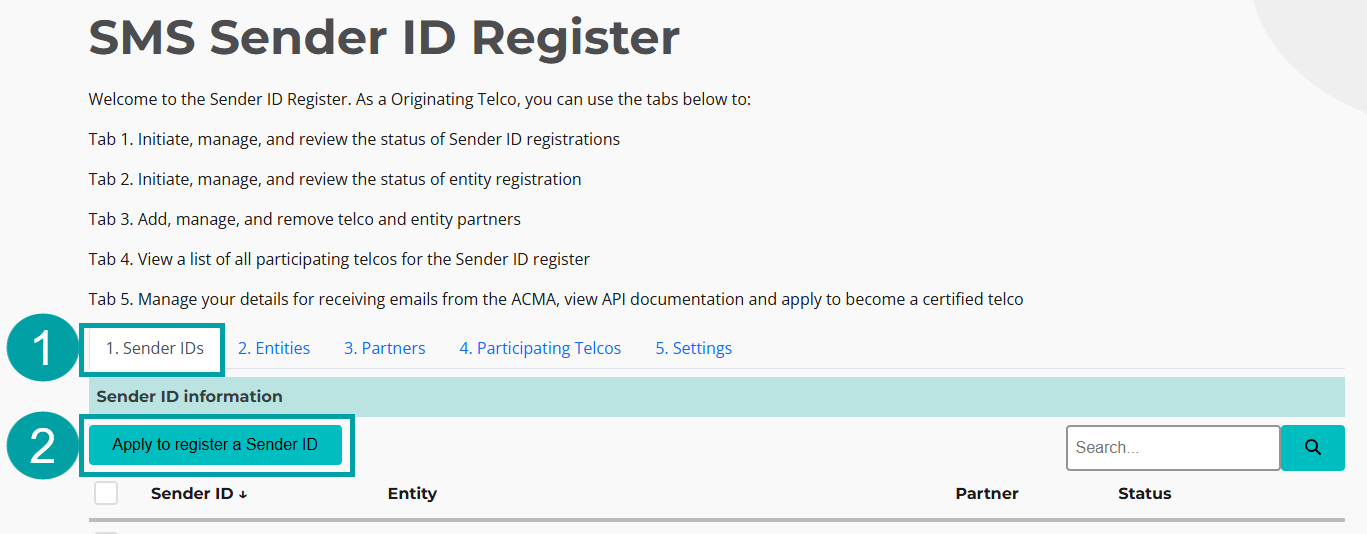
- Click on the Sender IDs tab.
- Click on the Apply to register a Sender ID button.
|
The Application to register a sender ID pop-up window will appear.
Sender ID
- Enter the sender ID the entity wants to register in the Sender ID field.

|
To be registered with the ACMA, a sender ID must:
- only include characters 32–126 from the American Standard Code for Information Interchange (ASCII) decimal codes. ASCII can be accessed free of charge at www.ascii-code.com
- be at least 2 and no more than 11 characters long
- not consist only of numbers
- not contain a space or an underscore at the beginning or end of the sender ID
- not contain the word ‘unverified’
- not contain a word or words that are offensive, deceptive or misleading
- not solely consist of a restricted word or words published on the ACMA’s website.
Please note: sender IDs are case-insensitive (e.g. 'ACMA' is the same as 'acma').
- If applicable, enter an expiry date in the Expires on (Optional) field. This is an optional field and should only be used if the entity will use the sender ID for a limited period of time. The expiry date must be between 7 days and 12 months.

|
Telco partner
If you are registering a sender ID with a telco partner, follow the instructions below. If not, skip this step.
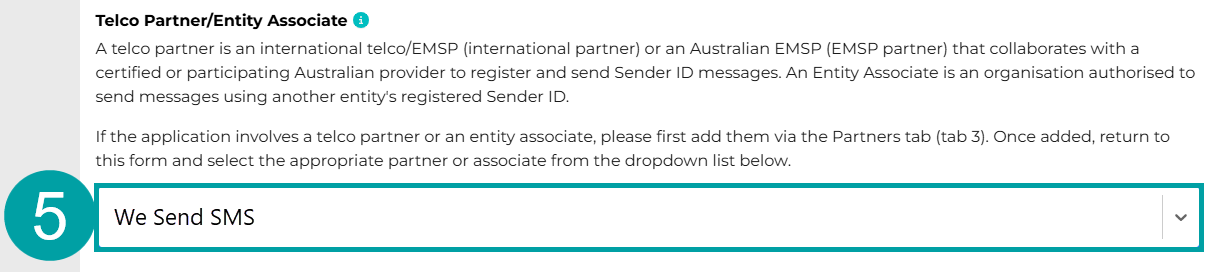
5. Select a Telco partner from the dropdown list
|
Entity associate
If you are registering a sender ID on request of an entity associate, follow the instructions below. If not, skip this step.
The entity associate registration process consists of 2 components. You must:
- submit an application to register the entity associate
- submit an application to register the sender ID that the entity associate has requested to use, confirming that the entity who owns the sender ID:
- agrees to register the sender ID
- consents to the entity associate using that sender ID.
Section 5.1 for instructions to register a non-ABN entity associate.
Section 5.2 for instructions to register an ABN entity associate.
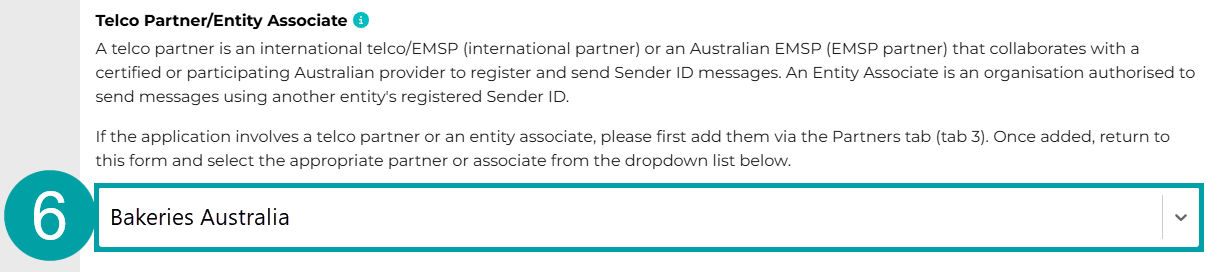
6. Select an Entity associate from the drop-down list.
|
Note: If an entity associate is applying to register a sender ID via a telco partner, you must:
- enter the telco partner’s name in the application that you submit under section 5.1 or 5.2 to register the entity associate
- enter the entity associate’s name in the application that you submit under section 6 to register the sender ID for the sender ID owner.
Entity details
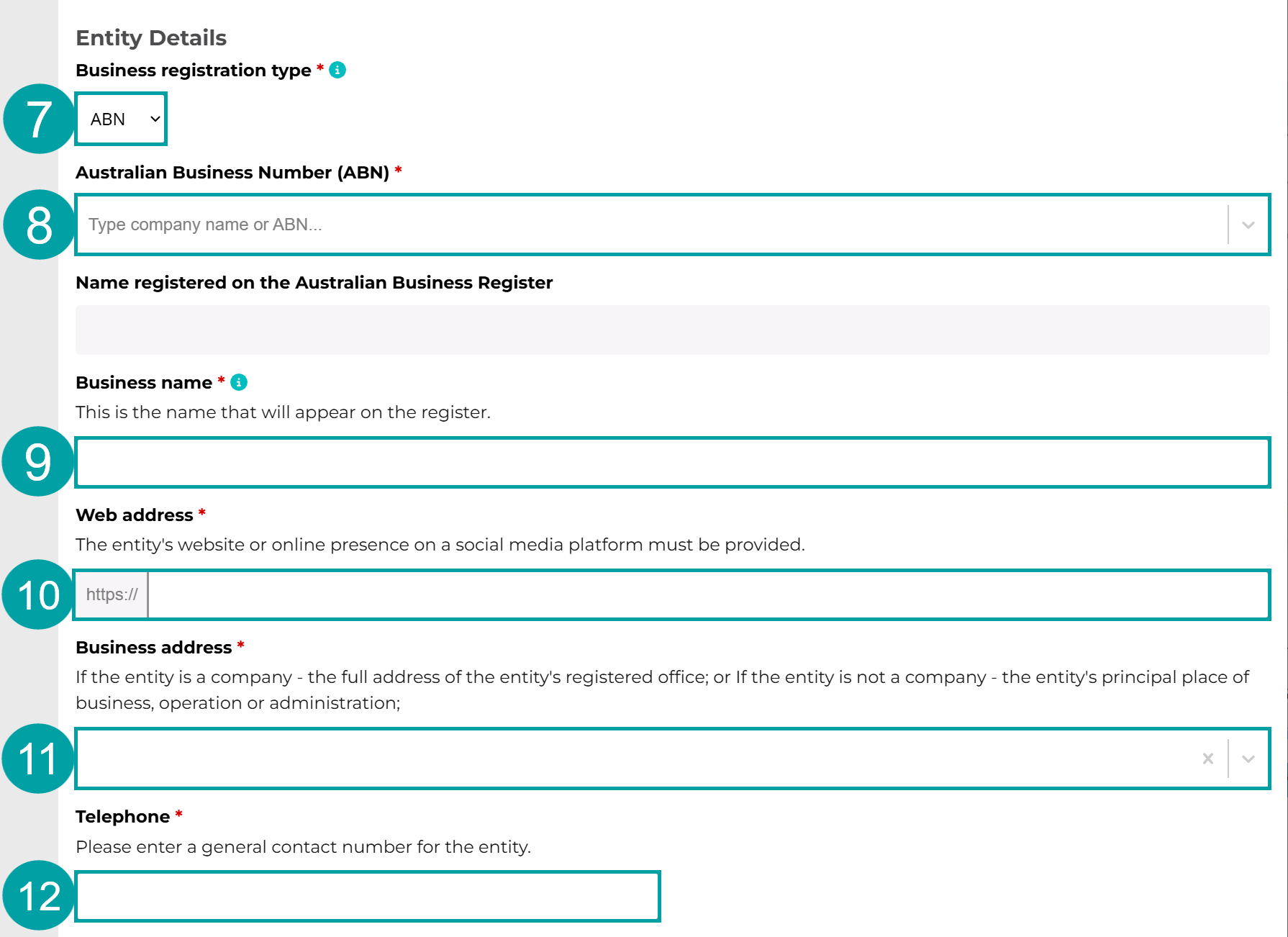
- Choose ABN from the Business registration type drop-down menu.
- Start typing the entity’s ABN or name into the Australian Business number (ABN) field and select it from the drop-down list. The name of the entity will auto-populate in the Name registered on the Australian Business Register field.
- The same name will also auto-populate the Business name field. This name can be overwritten with the entity’s business name, as registered on the Business Names Register.
- Enter the entity’s website, or online presence on a social media platform, in the Web address field.
- Enter the entity’s address in the Business address field. If the entity is a company – the full address of their registered office must be provided. If the entity is not a company – the address of their principal place of business, operation or administration must be provided.
- Enter the entity’s phone number in the Telephone field.
|
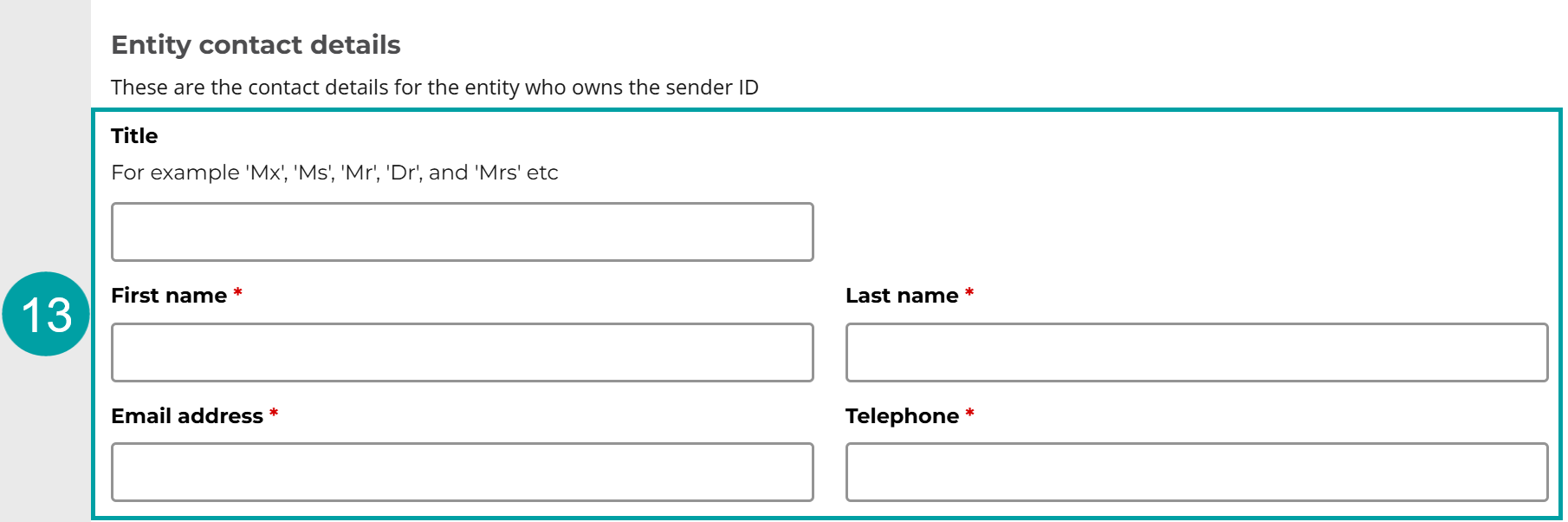
Entity contact details
- Enter the contact details of the representative for the entity that you are registering the sender ID on behalf of into the Entity contact details fields. These details will be used to contact the entity to notify it of the outcome of the application.
|
Required checks
As the ABN entity has asked to be treated as an ABN entity, you do not need to complete the verification checks. The ACMA will verify the entity using the Australian Business Register and the identity of the representative using myID.
- Select No to the question, Have you verified the entity and the identity of its representative by conducting your own internal checks?

|
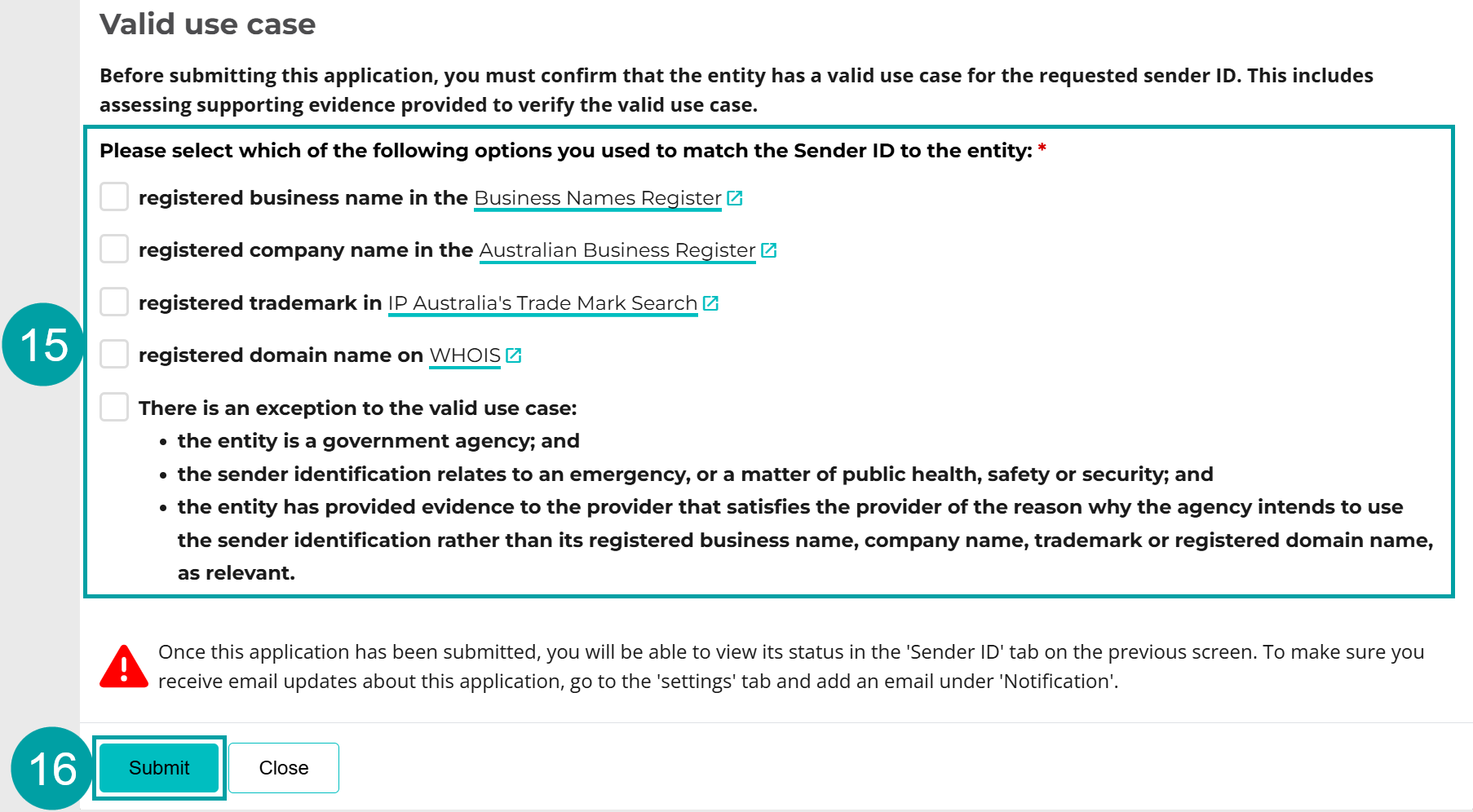
Valid use case for entities with an ABN
You must confirm that the entity has a valid use case for the sender ID before you can submit the application. The sender ID must be any of the following:
- the same as
- a contraction or abbreviation of
- an acronym of
- an initialism of
either the entity’s:
- registered business name in the Business Names Register, and the status must be ‘registered’
- registered company name in the Australian Business Register, and the status must be ‘active’
- registered trademark in IP Australia’s Trade Mark Search or equivalent register, and the status must be ‘registered’, or
- registered domain name on WHOIS, the entity is the ‘registrant’ and the domain name is used for an active and legitimate website, or an active email address.
There is an exception to the valid use case requirements if the entity meets all of the following criteria:
- the entity is a government agency; and
- the sender identification relates to an emergency, or a matter of public health, safety or security; and
- the entity has provided evidence to the provider that satisfies the provider of the reason why the agency intends to use the sender identification rather than its registered business name, company name, trademark or registered domain name, as relevant.
The entity is not entitled to an exemption unless it meets every criterion.
- Check the box next to the valid use case/s you have used to match the sender ID to the entity. You can select more than one from the first 4 boxes. DO NOT select the exception box unless all of the exception criteria listed above apply.
- Click the Submit button.
|
The sender ID status will now show as Submitted in the register and an email will be sent to the entity contact nominated in step 13 asking them to confirm the registration application. If the application involves an entity associate, the entity associate will be mentioned in this email.

|
Once the application is approved by the ACMA, the entity and you will be notified and the status will be updated to Ready to use.
If the application involves an entity associate, you must notify the entity associate whether the sender ID has been registered or not.
6.2.2 Apply to register a sender ID for an ABN entity as a non-ABN entity (Option 2)
To apply to register a sender ID for an ABN entity as a non-ABN entity (Option 2):
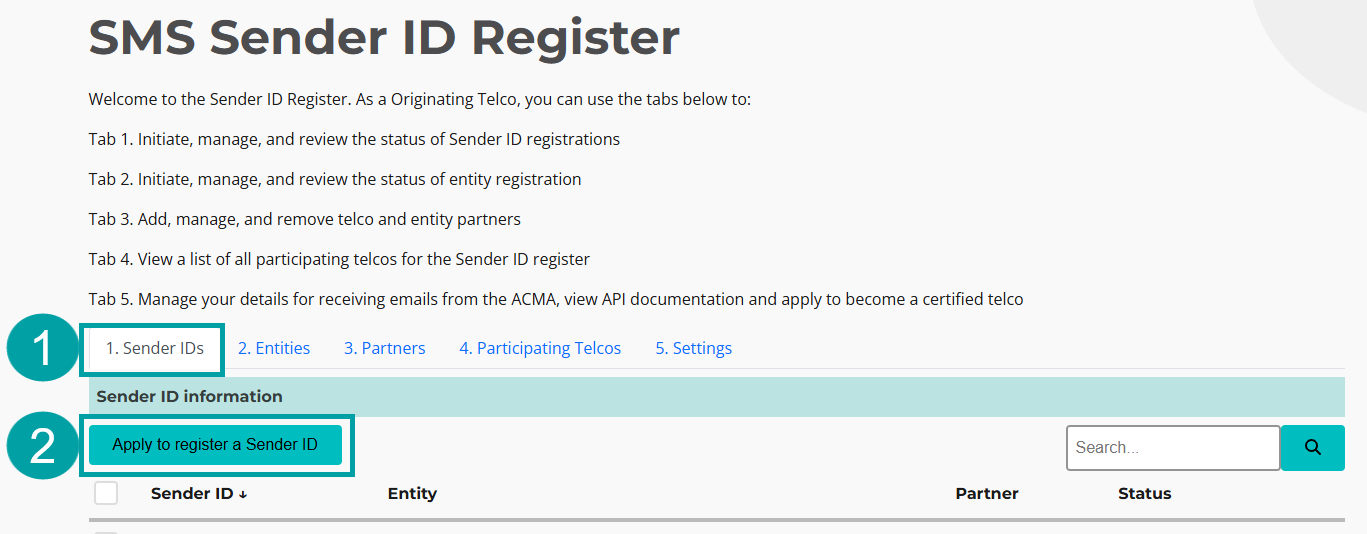
- Click on the Sender IDs tab.
- Click on the Apply to register a Sender ID button.
|
The Application to register a sender ID pop-up window will appear.
Sender ID
- Enter the sender ID the entity wants to register in the Sender ID field.

|
To be registered with the ACMA, a sender ID must:
- only include characters 32–126 from the American Standard Code for Information Interchange (ASCII) decimal codes. ASCII can be accessed free of charge at www.ascii-code.com
- be at least 2 and no more than 11 characters long
- not consist only of numbers
- not contain a space or an underscore at the beginning or end of the sender ID
- not contain the word ‘unverified’
- not contain a word or words that are offensive, deceptive or misleading
- not solely consist of a restricted word or words published on the ACMA’s website.
Please note: sender IDs are case-insensitive (e.g. 'ACMA' is the same as 'acma').
- If applicable, enter an expiry date in the Expires on (Optional) field. This is an optional field and should only be used if the entity will use the sender ID for a limited period of time. The expiry date must be between 7 days and 12 months.

|
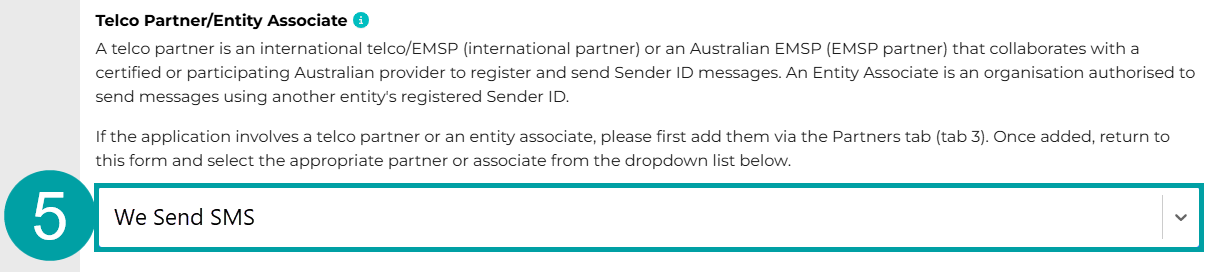
Telco partner
If you are registering a sender ID with a telco partner, follow the instructions below. If not, skip this step.
5. Select a Telco partner from the drop-down list
|
Entity associate
If you are registering a sender ID on request of an entity associate, follow the instructions below. If not, skip this step.
The entity associate registration process consists of 2 components. You must:
- submit an application to register the entity associate
- submit an application to register the sender ID that the entity associate has requested to use, confirming that the entity who owns the sender ID:
- agrees to register the sender ID
- consents to the entity associate using that sender ID.
Note:Refer to:
- Section 5.1 for instructions to register a non-ABN entity associate.
- Section 5.2 for instructions to register an ABN entity associate.
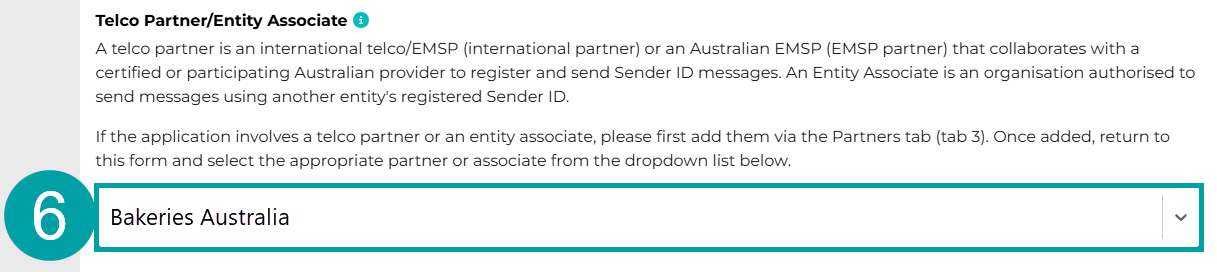
- Select an Entity associate from the drop-down list. If the entity does not consent to the entity associate using the sender ID, you must leave this field blank and advise the entity associate that they do not have permission to use the sender ID.
|
Note: If the application to register a sender ID involves an entity associate and a telco partner (for example, an entity associate is applying to register a sender ID via a telco partner), you must:
- enter the telco partner’s name in the application that you submit under section 5.1 or 5.2 to register the entity associate
- enter the entity associate’s name in the application that you submit under section 6 to register the sender ID for the sender ID owner.
Entity details
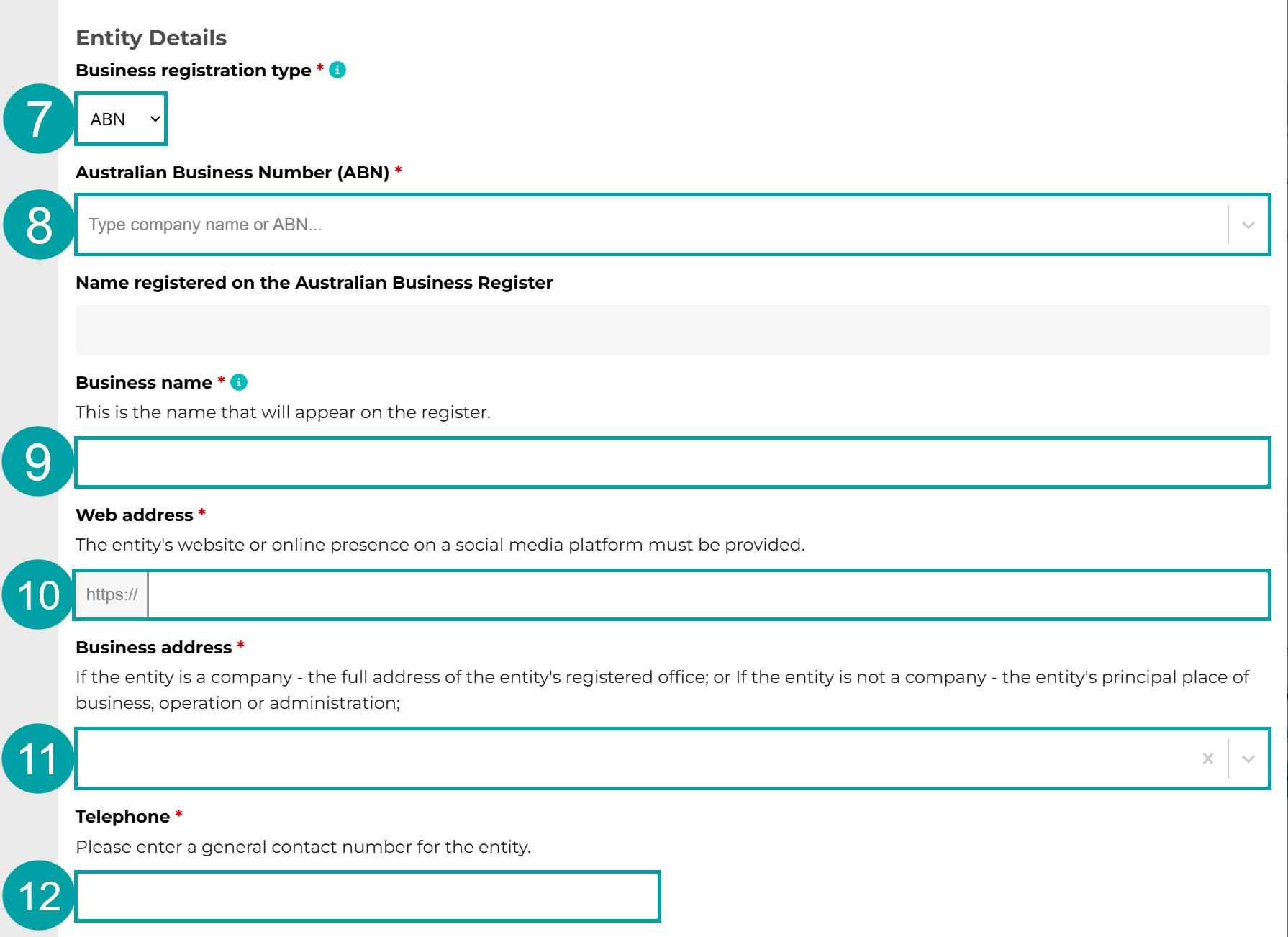
If you used an ABN to verify the entity:
- Choose ABN from the Business registration type drop-down menu.
- Start typing the entity’s ABN or name into the Australian Business number (ABN) field and select it from the drop-down list. The name of the entity will auto-populate in the Name registered on the Australian Business Register field.
- The same name will also auto-populate the Business name field. This name can be overwritten with the entity’s business name, as registered on the Business Names Register.
- Enter the entity’s website, or online presence on a social media platform, in the Web address field.
- Enter the entity’s address in the Business address field. If the entity is a company – the full address of their registered office must be provided. If the entity is not a company – the address of their principal place of business, operation or administration must be provided.
- Enter the entity’s phone number in the Telephone field.
Skip to Entity contact details
|
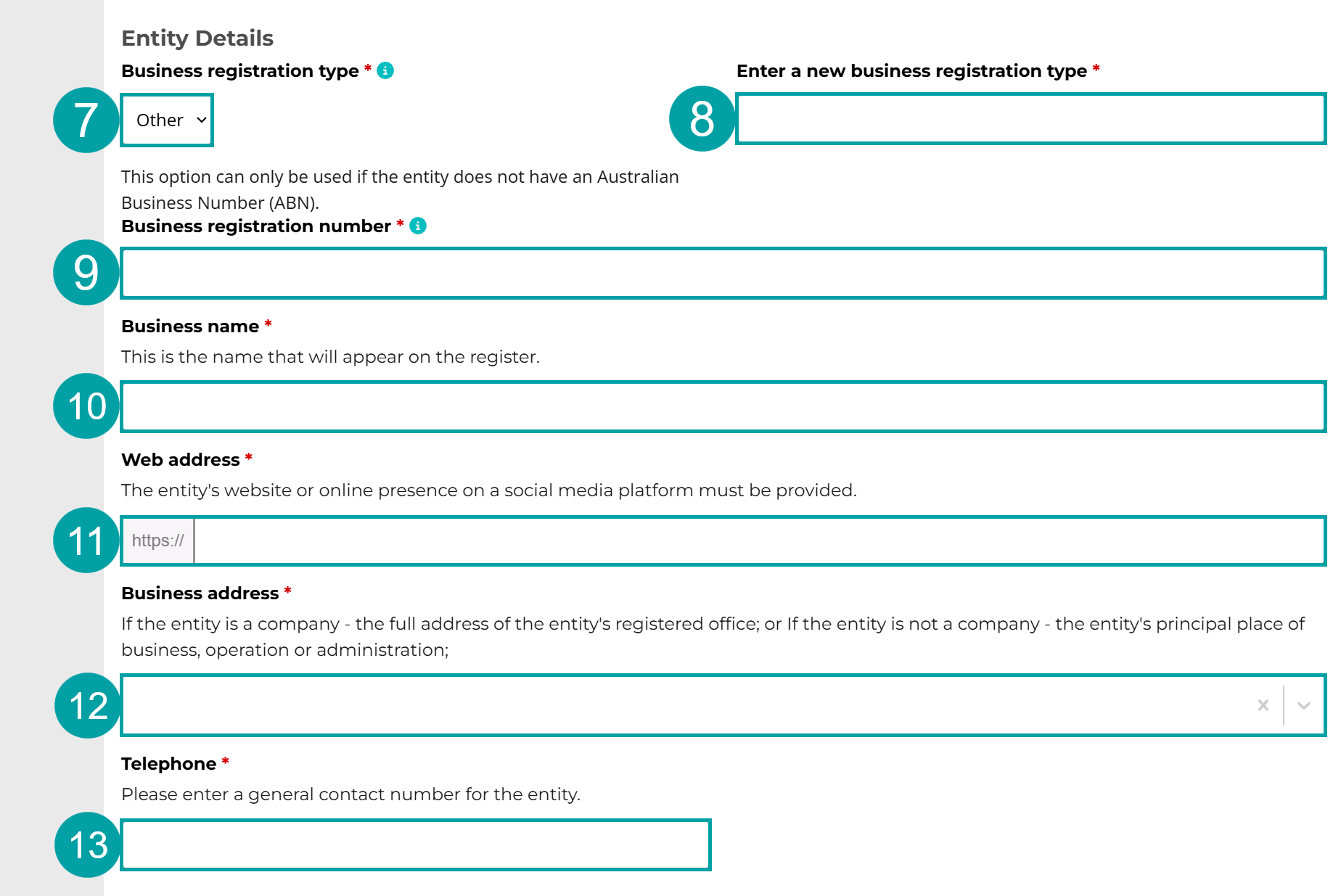
If you used another registration or accreditation number to verify the entity:
- Select Other from the Business registration type drop-down menu.
- In the Enter a new business registration type field, enter the type of unique identifier you have used to confirm that the entity associate has been officially recognised or certified by a governing body, regulatory authority or accreditation organisation in the country in which the entity associate is based. For example:
- Company Registration Number (CRN)
- Australian Company Number (ACN)
-
New Zealand Business Number (NZBN).
If the entity associate does not have a unique identifier, enter ‘other’ in this field.
- In the Business registration number field, enter the entity’s unique identifier. If the entity’s official recognition or certification does not include a unique identifier, enter the entity’s name exactly as it is entered on the official record of recognition or certification.
- Enter the entity’s name in the Business name field.
- Enter the entity’s website, or online presence on a social media platform, in the Web address field.
- Enter the entity’s address in the Business address field. If the entity is a company, the full address of their registered office must be provided. If the entity is not a company, the address of their principal place of business, operation or administration must be provided.
- Enter the entity’s phone number in the Telephone field.
|
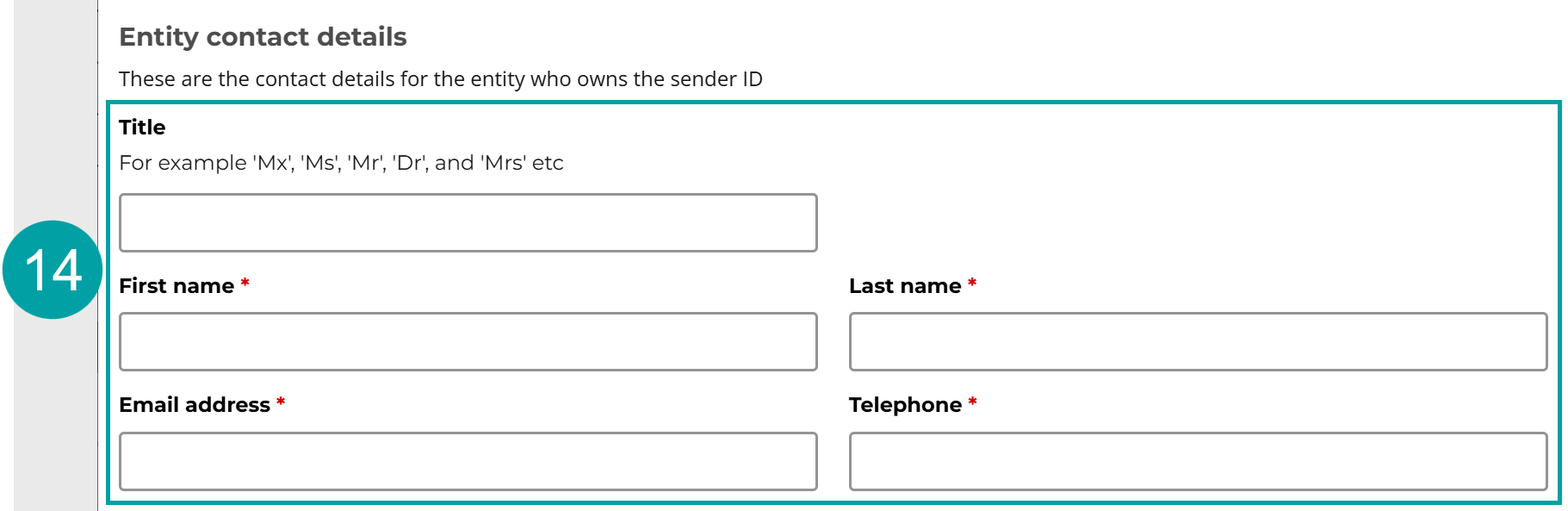
Entity contact details
- Enter the contact details of the representative for the entity that you are registering the sender ID on behalf of into the Entity contact details fields. These details will be used to contact the entity to notify it of the outcome of the application.
|
Required checks
As the entity has asked to be treated the same as a non-ABN entity, you must complete the following checks before you can apply to register the sender IDs on the entity’s behalf.
- Select Yes to confirm that you have completed the following checks for the entity:
- Confirmed the identity of the individual making the application, using an approved identity verification service.
- Confirmed that the individual is an authorised representative of the entity.
- Confirmed that the entity has been officially recognised or certified by a governing body, regulatory or accreditation organisation in the country in which the entity is based.
As

|
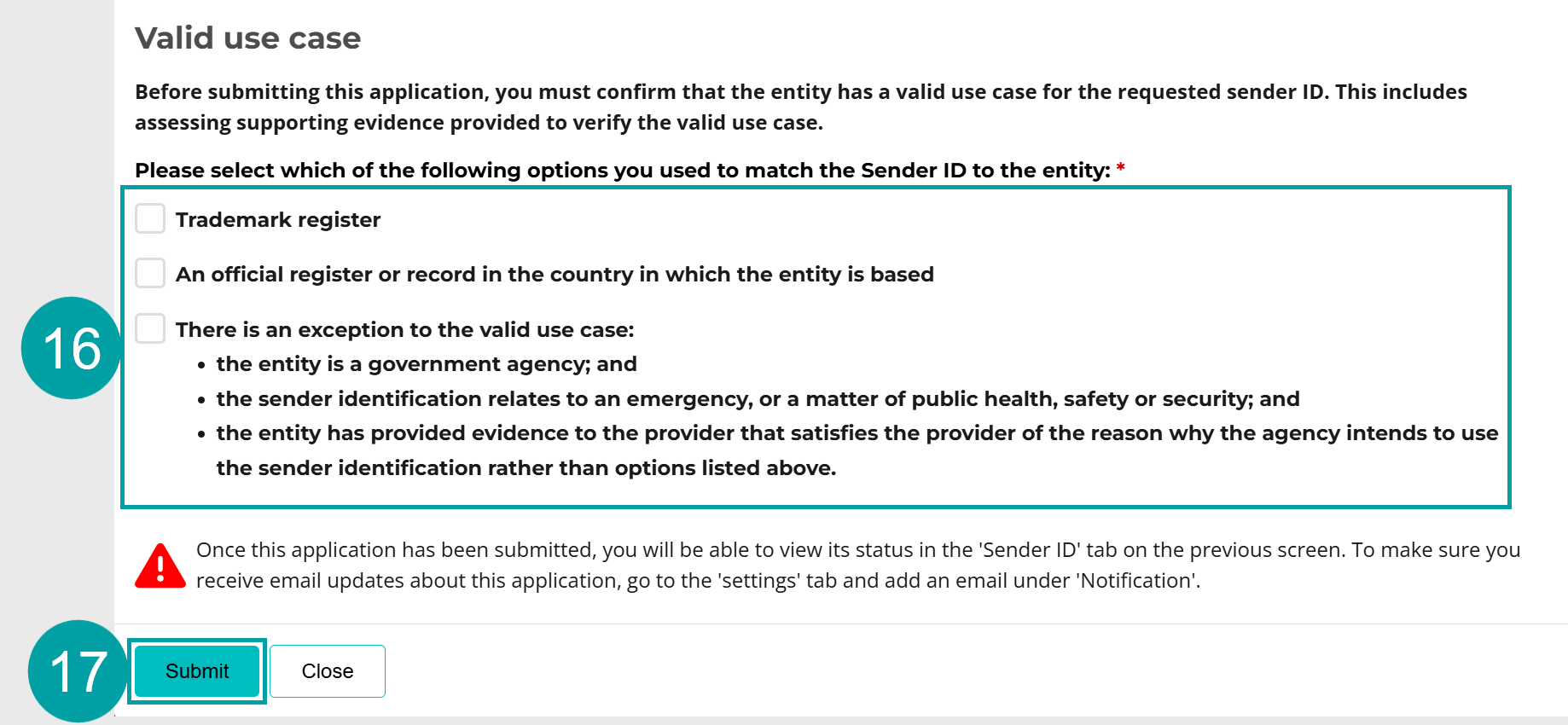
Valid use case for non-ABN entities
You must confirm that the entity has a valid use for the sender ID before you can submit the application. The sender ID must be any of the following:
- the same as
- a contraction or abbreviation of
- an acronym of
- an initialism of
either the entity’s:
- name on a trademark register
- name on an official register or record in the country in which the entity is based.
There is an exception to the valid use case if the entity meets all of the following criteria:
- the entity is a government agency; and
- the sender identification relates to an emergency, or a matter of public health, safety or security; and
- the entity has provided evidence to the provider that satisfies the provider of the reason why the agency intends to use the sender identification rather than its trademark or name on an official register or record in the country in which the entity is based, as relevant.
The entity is not entitled to an exemption unless it meets every criterion.
- Check the box next to the valid use case/s you have used to match the sender ID to the entity. You can select both of the first 2 boxes if applicable. DO NOT select the exception box unless all of the exception criteria listed above apply.
- Click the Submit button.
|
Your application will now be submitted. An email will be sent to you, and the entity contact nominated in step 14 notifying whether the registration of the sender ID has been approved by the ACMA. The status will update to Ready to use in the register once the application has been approved.
If the application involves an entity associate, the entity associate will be mentioned in the email.
You must notify the entity associate whether the sender ID has been registered or not.

|
Key terms
ABN (Australian Business Number)
Has the meaning given by section 41 of the A New Tax System (Australian Business Number) Act 1999.
ABR (Australian Business Register)
The register established under section 24 of the A New Tax System (Australian Business Number) Act 1999.
ABN entity
An entity with an ABN as listed on the ABR.
ACMA Assist
ACMA Assist is the online portal for the ACMA.
Certified telecommunications provider (certified telco)
A participating telco that is an originating telco that has been approved by the ACMA to be a certified telecommunications provider. A certified telco can apply to register sender IDs and send sender ID messages on behalf of non-ABN entities.
Customer
An entity that has a contractual arrangement with their telco relating to the sending of sender ID messages.
Electronic messaging service provider (EMSP)
EMSPs are defined in section 108A of the Telecommunications Act 1997 and include providers involved in sending text messages, such as:
- SMS aggregators
- customer relationship management platform providers
- software as a service providers
- communications platform as a service providers
- automated marketing platform providers
- two-factor authentication providers
After the ACMA approves the application, and in accordance with subsection 4(3) of the Standard, an EMSP can comply with its obligations under the Standard by:
- fulfilling the obligations itself, or
- becoming an EMSP partner, by arranging with another participating telco to fulfill some or all of the obligations on its behalf under subsection 13(5) of the Standard.
EMSP partner
An electronic messaging service provider that has a direct relationship with an entity and who has partnered with:
- any participating telco that is an originating telco – if the EMSP’s customers are ABN entities, or
- an originating telco that is a certified telco – if the EMSP’s customers are a non-ABN entity.
and has arranged for the provider to fulfill some or all of the EMSP’s obligations under the Standard on its behalf.
Entity
One of the following who uses or proposes to use sender ID messages:
- an individual
- a body corporate
- a corporation sole
- a body politic
- a government entity (within the meaning of the A New Tax System (Australian Business Number) Act 1999)
- a partnership
- any other unincorporated association or body of persons
- a trust
- a superannuation fund (within the meaning of the Superannuation Industry (Supervision) Act 1993).
Entity associate
An entity who is authorised by another entity to send sender ID messages using the sender ID registered in the register for that other entity. Examples of entity associates are:
- a research company that has been engaged by a bank to send messages for the bank, using its sender ID
- a sports club that is authorised to send messages, using a sender ID that is owned by a sports league
- an advertising or marketing agency engaged by a business to run advertising and promotional campaigns, using a sender ID owned by that business.
International partner
An international telecommunications service provider that has a direct relationship with an entity and who has partnered with either:
- any participating telco that is an originating telco – if the international telco’s customers are ABN entities.
- an originating telco that is a certified telco – if the international telco’s customers are a non-ABN entity.
to make an application for registration of a sender ID and to send sender ID messages on behalf of the relevant customer.
Non-ABN entity
An international entity or a domestic entity without an ABN.
Domestic entities without an ABN may include:
- schools and educational institutions
- small non-profit organisations
- religious institutions or trusts
- social clubs and council groups
- hobby groups or neighbourhood sports groups
- individuals hosting one-off events, content creators or digital personalities
- foreign embassies and consulates based in Australia
- government entities/agencies
- small sole traders.
Originating telecommunications provider (originating telco)
A telco that agrees to send sender ID messages on behalf of any of the following:
- a customer
- an international partner
- an EMSP partner.
Participating telecommunications provider (participating telco)
A telco that has been approved by the ACMA to participate in the register.
Telecommunications provider (telco)
Any of the following:
- a carrier
- a carriage service provider
- an electronic messaging service provider.
Telco partner
An international partner or EMSP partner. Requirements relating to telco partners are set out in section 13 of the Standard.
Terminating telecommunications provider (terminating telco)
A carrier that is responsible for delivering sender ID messages to message recipients who are connected to a public mobile telecommunications service owned or controlled by the carrier.
Transiting telecommunications provider (transiting telco)
A telco that connects with other telcos to transit sender identification messages between 2 telcos over a telecommunications network.