
On this page
As a certified telco, there are 2 options for applying to register an ABN entity associate.
- Option 1− apply on behalf of the ABN entity associate as a participating telco – section 11 of the Standard applies. Follow the instructions in 5.2.1
- Option 2 − apply on behalf of the ABN entity associate as a certified telco – section 12 of the Standard applies. Follow the instructions in 5.2.2
This means that prior to commencing the application, you must establish which option the entity associate prefers. You may wish to note that if it elects to be treated as a non-ABN entity associate:
- its participation is not reliant on its ABR records being up to date and including current/accessible contacts (depending on the mechanism/s a certified telco uses to verify an entity associate and its authorised representatives)
- its employees that do not have Australian identity documents (for example, an Australian driver licence or passport) can represent the entity associate for the purposes of the register through a certified telco (for example, where an entity associate with an ABN has offices and staff offshore).
5.2.1 Register an ABN entity associate as an ABN entity associate (Option 1)
Ensure you have selected Originating Telco from the Sender ID register view in the Settings tab.
- Click on the Partners tab.
- Click on the Apply to register an entity associate button.

|
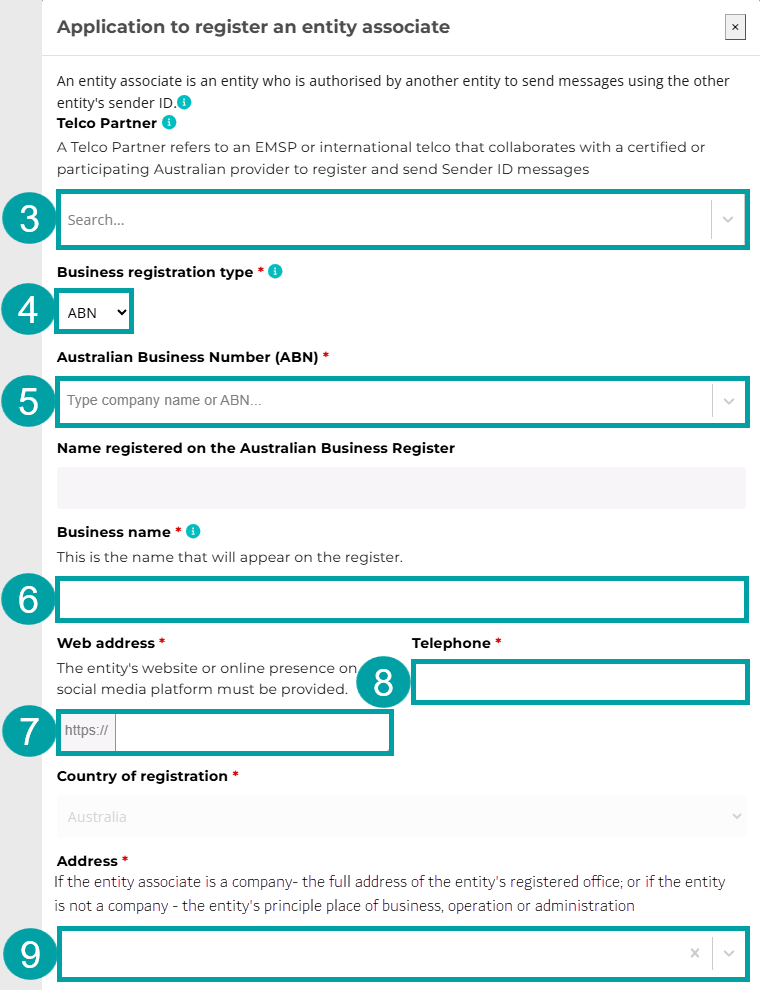
The Application to register an entity associate pop-up window will appear.
- If the entity associate is applying via a telco partner, select the telco partner from the Telco Partner drop-down list. If this application does not involve a telco partner, go to step 4.
If you are applying to register an entity associate in collaboration with an EMSP partner, they must first be approved to participate in the SMS Sender ID Register as an originating telco. You must then add them as a telco partner to your account. Refer to 4.5.1 Add a telco partner in the User guide for Telcos for instructions.
- Select ABN in the Business registration type field.
- Start typing the entity associate’s ABN or company name in the Australian Business Number (ABN) field and select it from the drop-down list. The name of the company will auto-populate in the Name registered on the Australian Business Register field.
- The same name will also auto-populate in the Business name field. This name can be overwritten with the entity associate’s business name, as registered on the Business Names Register.
- Enter the entity associate’s website, or online presence on a social media platform, in the Web address field.
- Enter the entity associate’s phone number in the Telephone field.
- Enter the entity associate’s address in the Address field. If the entity associate is a company, the full address of their registered office must be provided. If the entity associate is not a company, the address of their principal place of business, operation or administration must be provided.
|
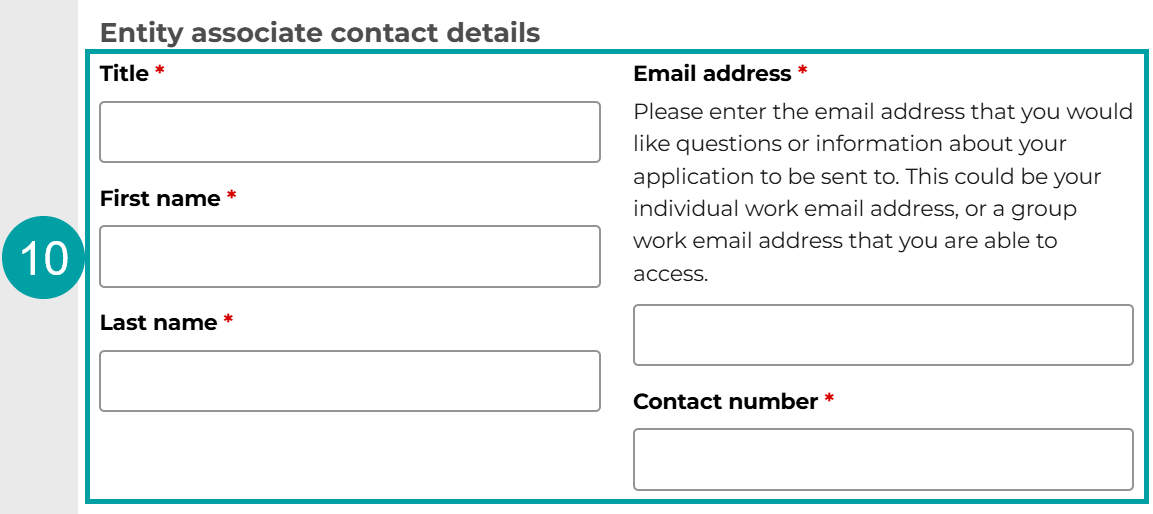
Entity associate contact details
- Enter the details of the contact person of the entity associate in the Entity associate contact details fields. These details will be used to contact the entity associate to notify it of the outcome of the application.
|
Required checks
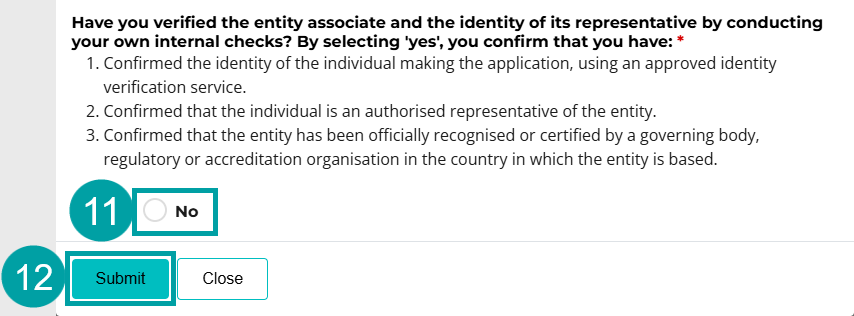
As the ABN entity associate has asked to be treated as an ABN entity, you do not need to complete the verification checks. The ACMA will verify the entity associate using the Australian Business Register and the identity of the representative using myID.
- Select No to the question, Have you verified the entity associate and the identity of its representative by conducting your own internal checks?
- Click Submit.
|
A pop-up message will display confirming you have submitted the application and outlining next steps.
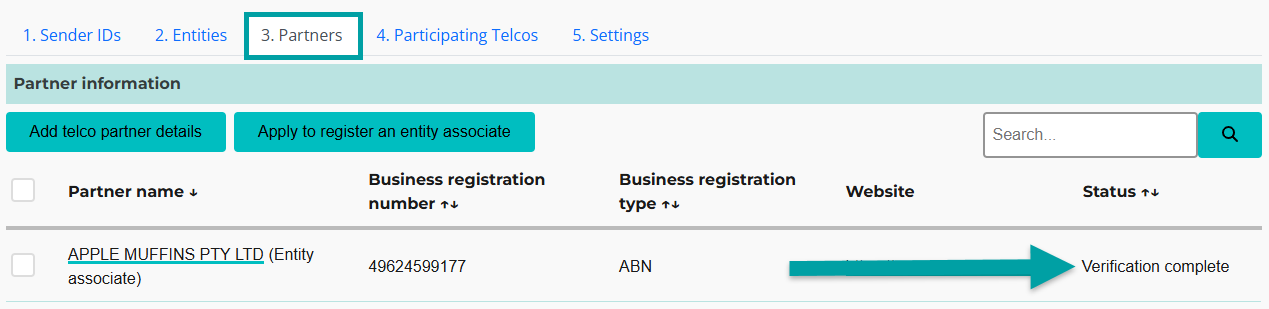
This completes the application to register the entity associate. Once the entity associate has confirmed the application and it has been approved by the ACMA, the status of the entity associate will appear in the Partners tab as Verification complete.
|
You must now submit an application to register the sender ID for the sender ID owner. The entity associate will provide the required information to enable you to submit the application (see Appendix A of the User guide for businesses and organisations for instructions for entity associates).
If the sender ID owner has an ABN
Follow the instructions in section 6.2 to register the sender ID.
After you have submitted the application to register the sender ID, the representative of the sender ID owner will receive an email with a unique link to the register. The email will list the sender ID and note that the application was made by the entity associate.
The sender ID owner’s representative must follow the unique link in the email to confirm the registration application. By confirming the application, they are agreeing to register the sender ID, AND confirming the entity associate has permission to use that sender ID.
The ACMA will notify the sender ID owner and you of the outcome of the application.
If the sender ID owner does not have an ABN
Before submitting an application to register the sender ID, you must confirm that the sender ID owner:
- agrees to register the sender ID
- agrees to the entity associate sending messages using the sender ID
You could do this by contacting the sender ID owner directly or by obtaining proof from the entity associate that the sender ID owner has provided this consent.
If the sender ID owner agrees, follow the instructions in section 6.1.
After you have submitted the application to register the sender ID, the ACMA will notify the sender ID owner and you of the outcome of the application. The email will list the sender ID and note that the application was made by the entity associate.
In both of the scenarios above, you must notify the entity associate of the outcome of the sender ID registration application.
You can only send sender ID messages for an entity associate if:
- the entity associate has been approved to participate in the register
the sender ID has been registered by the sender ID owner, including confirmation that the sender ID owner has authorised the entity associate to use the sender ID.
5.2.2 Register an ABN entity associate as a non-ABN entity associate (Option 2)
Ensure you have selected Originating Telco from the Sender ID register view in the Settings tab.
- Click on the Partners tab.
- Click on the Apply to register an entity associate button.

|
The Application to register an entity associate pop-up window will appear.
In the Business registration type field, you must select the registration type you have used to verify the entity, in accordance with your obligations as a certified telco. The next steps will depend on:
- If you used an ABN to verify the entity associate
- If you used another registration or accreditation number to verify the entity associate.
If you used an ABN to verify the entity associate:
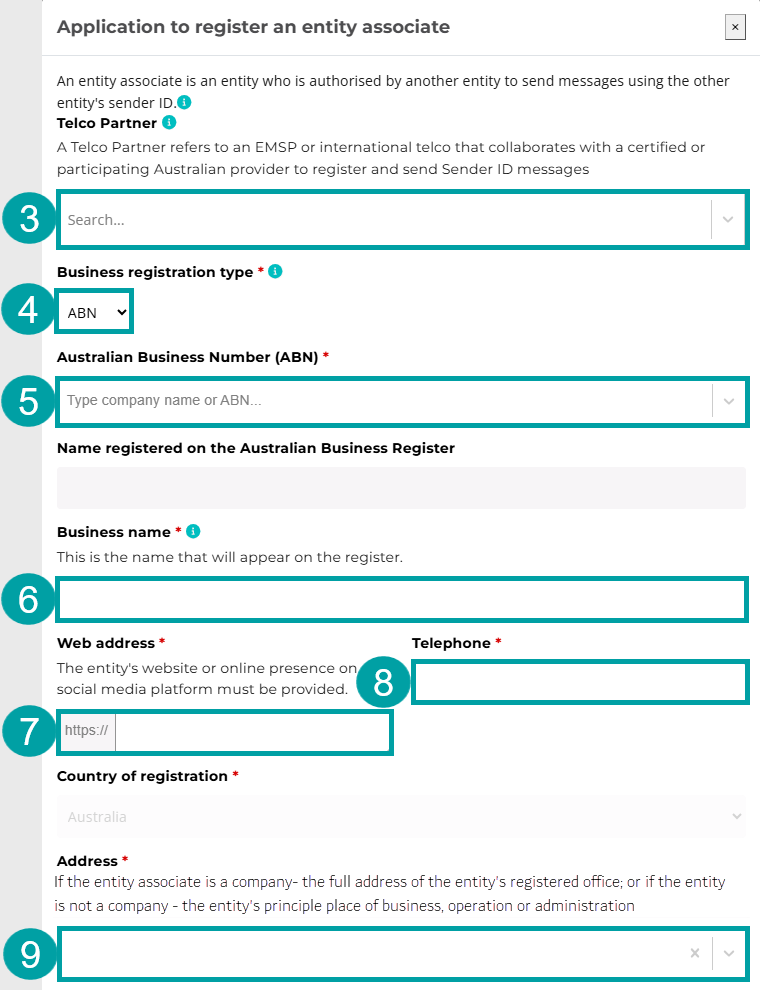
- If the entity associate is applying via a telco partner, select the telco partner from the Telco Partner drop-down list. If this application does not involve a telco partner, go to step 4.
If you are applying to register an entity associate in collaboration with an EMSP partner, they must first be approved to participate in the SMS Sender ID Register as an originating telco. You must then add them as a telco partner to your account. Refer to 4.5.1 Add a telco partner in the User guide for Telcos for instructions.
- Select ABN in the Business registration type field.
- Start typing the entity associate’s ABN or company name in the Australian Business Number (ABN) field and select it from the drop-down list. The name of the company will auto-populate in the Name registered on the Australian Business Register field.
- The same name will also auto-populate in the Business name field. This name can be overwritten with the entity associate’s business name, as registered on the Business Names Register.
- Enter the entity associate’s website, or online presence on a social media platform, in the Web address field.
- Enter the entity associate’s phone number in the Telephone field.
- Enter the entity associate’s address in the Address field. If the entity associate is a company, the full address of their registered office must be provided. If the entity associate is not a company, the address of their principal place of business, operation or administration must be provided.
Skip to Entity associate contact details
|
If you used another registration or accreditation number to verify the entity associate:
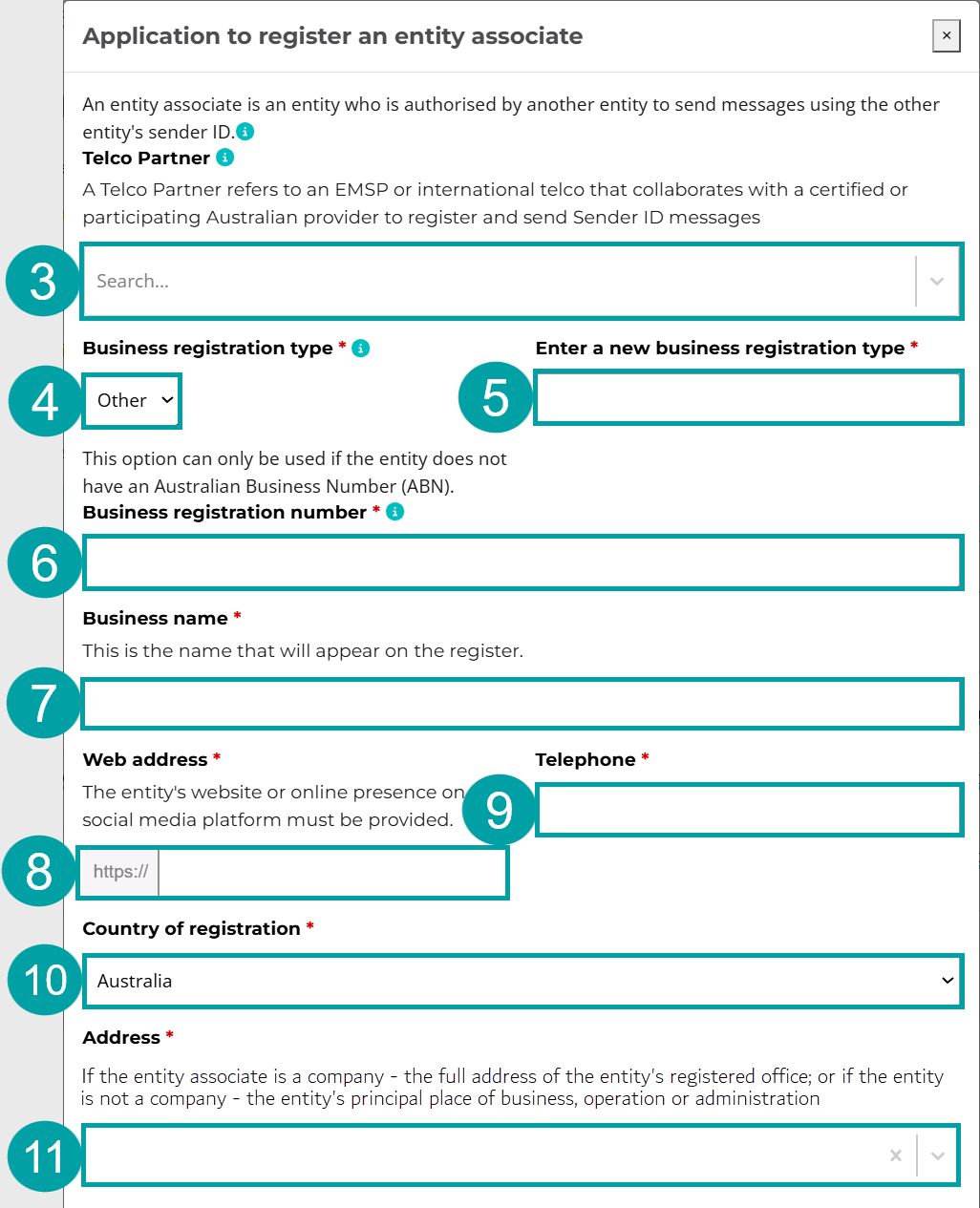
- If the entity associate is applying via a telco partner, select the telco partner from the Telco Partner drop-down list. If this application does not involve a telco partner, go to step 4.
If you are applying to register an entity associate in collaboration with an EMSP partner, they must first be approved to participate in the SMS Sender ID Register as an originating telco. You must then add them as a telco partner to your account. Refer to 4.5.1 Add a telco partner in the User guide for Telcos for instructions.
- Select Other in the Business registration type field.
- In the Enter a new business registration type field, enter the type of unique identifier you have used to confirm that the entity associate has been officially recognised or certified by a governing body, regulatory authority or accreditation organisation in the country in which the entity associate is based. For example:
- Company Registration Number (CRN)
- Australian Company Number (ACN)
- New Zealand Business Number (NZBN).
If the entity associate does not have a unique identifier, enter ‘other’ in this field.
- In the Business registration number field, enter the entity associate’s unique identifier. If the entity associate’s official recognition or certification does not include a unique identifier, enter the entity name exactly as it is entered on the official record of recognition or certification.
- Enter the entity associate’s name in the Business name field.
- Enter the entity associate’s website, or online presence on a social media platform, in the Web address field.
- Enter the entity associate’s phone number in the Telephone field.
- Select the entity associate’s Country of registration from the drop-down menu.
-
Enter the entity associate’s address in the Address field. If the entity associate is a company, the full address of their registered office must be provided. If the entity associate is not a company, the address of their principal place of business, operation or administration must be provided.
Entity associate contact details
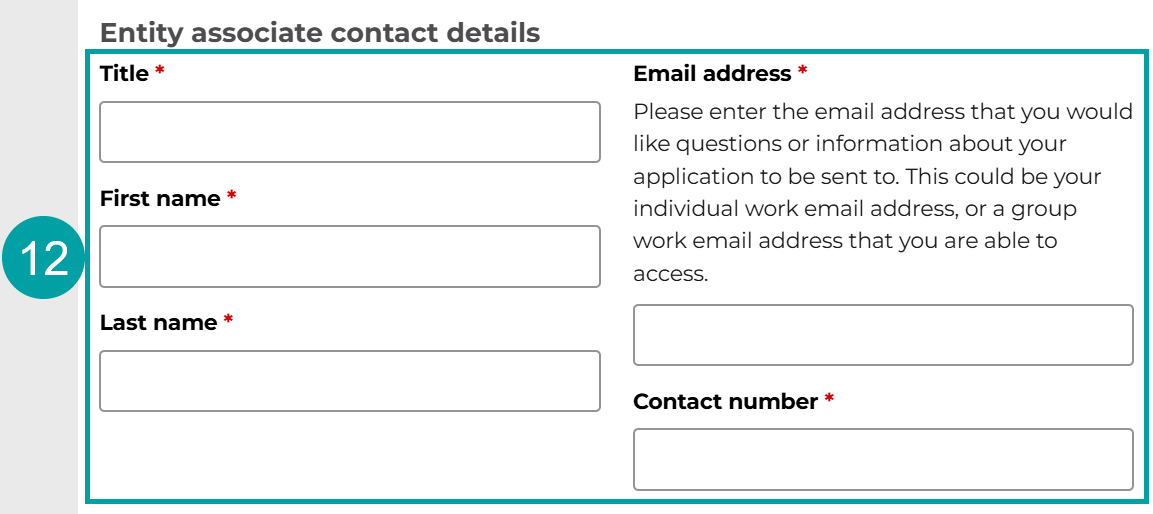
- Enter the details of the contact person of the entity associate in the Entity associate contact details fields. These details will be used to contact the entity associate to notify it of the outcome of the application.
|
Required checks
As the entity associate has asked to be treated the same as a non-ABN entity associate, you must complete the following checks before you can apply to register the sender IDs on the entity’s behalf.
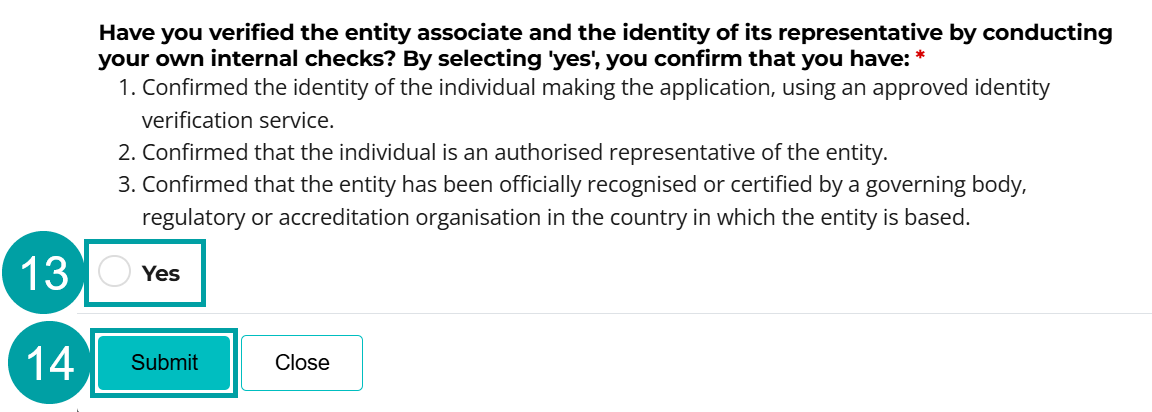
- Select Yes to confirm that you have completed the following checks for the entity associate:
- Confirmed the identity of the individual making the application, using an approved identity verification service.
- Confirmed that the individual is an authorised representative of the entity associate.
- Confirmed that the entity associate has been officially recognised or certified by a governing body, regulatory or accreditation organisation in the country in which the entity associate is based.
- Click Submit.
|
A pop-up message will display confirming you have submitted the application and outlining next steps.
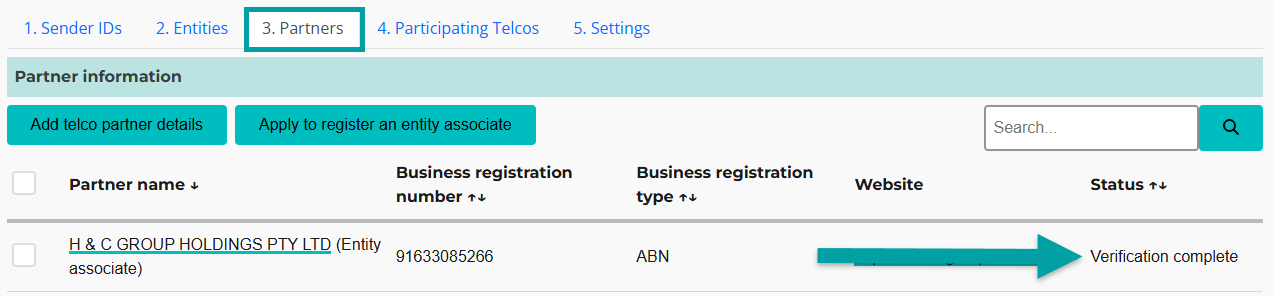
This completes the application to register the entity associate. Once the application has been approved by the ACMA, the status of the entity associate will appear in your partner list as Verification complete.
|
You must now submit an application to register the sender ID for the sender ID owner. The entity associate will provide the required information to enable you to submit the application (see Appendix A of the User guide for businesses and organisations for instructions for entity associates).
If the sender ID owner has an ABN
Follow the instructions in section 6.2 to register the sender ID.
After you have submitted the application to register the sender ID, the representative of the sender ID owner will receive an email with a unique link to the register. The email will list the sender ID and note that the application was made by the entity associate.
The sender ID owner’s representative must follow the unique link in the email to confirm the registration application. By confirming the application, they are agreeing to register the sender ID, AND confirming the entity associate has permission to use that sender ID.
The ACMA will notify the sender ID owner and you of the outcome of the application.
If the sender ID owner does not have an ABN
Before submitting an application to register the sender ID, you must confirm that the sender ID owner:
- agrees to register the sender ID
- agrees to the entity associate sending messages using the sender ID.
You could do this by contacting the sender ID owner directly or by obtaining proof from the entity associate that the sender ID owner has provided this consent.
If the sender ID owner agrees, follow the instructions in section 6.1.
After you have submitted the application to register the sender ID, the ACMA will notify the sender ID owner and you of the outcome of the application. The email will list the sender ID and note that the application was made by the entity associate.
In both of the scenarios above, you must notify the entity associate of the outcome of the sender ID registration application.
You can only send sender ID messages for an entity associate if:
- the entity associate has been approved to participate in the register
- the sender ID has been registered by the sender ID owner, including confirmation that the sender ID owner has authorised the entity associate to use the sender ID.
Key terms
ABN (Australian Business Number)
Has the meaning given by section 41 of the A New Tax System (Australian Business Number) Act 1999.
ABR (Australian Business Register)
The register established under section 24 of the A New Tax System (Australian Business Number) Act 1999.
ABN entity
An entity with an ABN as listed on the ABR.
ACMA Assist
ACMA Assist is the online portal for the ACMA.
Certified telecommunications provider (certified telco)
A participating telco that is an originating telco that has been approved by the ACMA to be a certified telecommunications provider. A certified telco can apply to register sender IDs and send sender ID messages on behalf of non-ABN entities.
Customer
An entity that has a contractual arrangement with their telco relating to the sending of sender ID messages.
Electronic messaging service provider (EMSP)
EMSPs are defined in section 108A of the Telecommunications Act 1997 and include providers involved in sending text messages, such as:
- SMS aggregators
- customer relationship management platform providers
- software as a service providers
- communications platform as a service providers
- automated marketing platform providers
- two-factor authentication providers
After the ACMA approves the application, and in accordance with subsection 4(3) of the Standard, an EMSP can comply with its obligations under the Standard by:
- fulfilling the obligations itself, or
- becoming an EMSP partner, by arranging with another participating telco to fulfill some or all of the obligations on its behalf under subsection 13(5) of the Standard.
EMSP partner
An electronic messaging service provider that has a direct relationship with an entity and who has partnered with:
- any participating telco that is an originating telco – if the EMSP’s customers are ABN entities, or
- an originating telco that is a certified telco – if the EMSP’s customers are a non-ABN entity.
and has arranged for the provider to fulfill some or all of the EMSP’s obligations under the Standard on its behalf.
Entity
One of the following who uses or proposes to use sender ID messages:
- an individual
- a body corporate
- a corporation sole
- a body politic
- a government entity (within the meaning of the A New Tax System (Australian Business Number) Act 1999)
- a partnership
- any other unincorporated association or body of persons
- a trust
- a superannuation fund (within the meaning of the Superannuation Industry (Supervision) Act 1993).
Entity associate
An entity who is authorised by another entity to send sender ID messages using the sender ID registered in the register for that other entity. Examples of entity associates are:
- a research company that has been engaged by a bank to send messages for the bank, using its sender ID
- a sports club that is authorised to send messages, using a sender ID that is owned by a sports league
- an advertising or marketing agency engaged by a business to run advertising and promotional campaigns, using a sender ID owned by that business.
International partner
An international telecommunications service provider that has a direct relationship with an entity and who has partnered with either:
- any participating telco that is an originating telco – if the international telco’s customers are ABN entities.
- an originating telco that is a certified telco – if the international telco’s customers are a non-ABN entity.
to make an application for registration of a sender ID and to send sender ID messages on behalf of the relevant customer.
Non-ABN entity
An international entity or a domestic entity without an ABN.
Domestic entities without an ABN may include:
- schools and educational institutions
- small non-profit organisations
- religious institutions or trusts
- social clubs and council groups
- hobby groups or neighbourhood sports groups
- individuals hosting one-off events, content creators or digital personalities
- foreign embassies and consulates based in Australia
- government entities/agencies
- small sole traders.
Originating telecommunications provider (originating telco)
A telco that agrees to send sender ID messages on behalf of any of the following:
- a customer
- an international partner
- an EMSP partner.
Participating telecommunications provider (participating telco)
A telco that has been approved by the ACMA to participate in the register.
Telecommunications provider (telco)
Any of the following:
- a carrier
- a carriage service provider
- an electronic messaging service provider.
Telco partner
An international partner or EMSP partner. Requirements relating to telco partners are set out in section 13 of the Standard.
Terminating telecommunications provider (terminating telco)
A carrier that is responsible for delivering sender ID messages to message recipients who are connected to a public mobile telecommunications service owned or controlled by the carrier.
Transiting telecommunications provider (transiting telco)
A telco that connects with other telcos to transit sender identification messages between 2 telcos over a telecommunications network.